Compare commits
1
Commits
| Author | SHA1 | Date | |
|---|---|---|---|
 Lei Nelissen Lei Nelissen
|
4508f6cc1c |
@@ -0,0 +1,6 @@
|
||||
|
||||
[android]
|
||||
target = Google Inc.:Google APIs:23
|
||||
|
||||
[maven_repositories]
|
||||
central = https://repo1.maven.org/maven2
|
||||
@@ -0,0 +1,3 @@
|
||||
# Windows files
|
||||
[*.bat]
|
||||
end_of_line = crlf
|
||||
@@ -52,12 +52,6 @@ module.exports = {
|
||||
'react/prop-types': 'off',
|
||||
'@typescript-eslint/no-unused-vars': [
|
||||
'error'
|
||||
],
|
||||
'react/jsx-no-literals': [
|
||||
'error',
|
||||
{
|
||||
ignoreProps: true
|
||||
}
|
||||
]
|
||||
},
|
||||
settings: {
|
||||
|
||||
@@ -0,0 +1,3 @@
|
||||
# Windows files should use crlf line endings
|
||||
# https://help.github.com/articles/dealing-with-line-endings/
|
||||
*.bat text eol=crlf
|
||||
@@ -25,7 +25,7 @@ jobs:
|
||||
SENTRY_ORG: ${{ secrets.SENTRY_ORG }}
|
||||
SENTRY_PROJECT: ${{ secrets.SENTRY_PROJECT }}
|
||||
SENTRY_URL: ${{ secrets.SENTRY_URL }}
|
||||
run: bundle exec fastlane android build
|
||||
run: bundle exec fastlane android beta
|
||||
- name: Upload artifact
|
||||
uses: actions/upload-artifact@v2
|
||||
with:
|
||||
|
||||
+4
-4
@@ -39,6 +39,9 @@ node_modules/
|
||||
npm-debug.log
|
||||
yarn-error.log
|
||||
|
||||
# BUCK
|
||||
buck-out/
|
||||
\.buckd/
|
||||
*.keystore
|
||||
!debug.keystore
|
||||
|
||||
@@ -70,7 +73,4 @@ sentry.properties
|
||||
|
||||
screenshots
|
||||
fastlane/Preview.html
|
||||
fastlane/play-store-credentials.json
|
||||
|
||||
# Temporary files created by Metro to check the health of the file watcher
|
||||
.metro-health-check*
|
||||
fastlane/play-store-credentials.json
|
||||
@@ -0,0 +1 @@
|
||||
16
|
||||
@@ -0,0 +1 @@
|
||||
2.7.4
|
||||
@@ -0,0 +1 @@
|
||||
{}
|
||||
@@ -1,59 +1,3 @@
|
||||
# [2.1.0](https://github.com/leinelissen/jellyfin-audio-player/compare/v2.0.5...v2.1.0) (2023-04-23)
|
||||
|
||||
|
||||
### Bug Fixes
|
||||
|
||||
* also add navigator padding when playing the first track in a queue ([1d7db11](https://github.com/leinelissen/jellyfin-audio-player/commit/1d7db11328dff87302be837f248845636c9834dc))
|
||||
* contentInset doesn't behave on Android ([1d97830](https://github.com/leinelissen/jellyfin-audio-player/commit/1d97830f831814c852b6efe61eb82367d13a3aca))
|
||||
* correctly calculate amount of minutes when an hour is present ([2e816f4](https://github.com/leinelissen/jellyfin-audio-player/commit/2e816f4a71f563de25032daa78c1310bdc320c58))
|
||||
* keep album views in search tab when navigating from search results ([e2c1c03](https://github.com/leinelissen/jellyfin-audio-player/commit/e2c1c0300f1a3cbf10b3552e6bad2c2a5535903b))
|
||||
* linter issues ([6ccfd19](https://github.com/leinelissen/jellyfin-audio-player/commit/6ccfd19dea656169ada8a2db3bd0af81d4391d67))
|
||||
* make similar albums translateable ([81b9ba6](https://github.com/leinelissen/jellyfin-audio-player/commit/81b9ba683a332052a1a4dd0d15c47a676ccdf522))
|
||||
* only show similar albums if there are any ([4ff071d](https://github.com/leinelissen/jellyfin-audio-player/commit/4ff071d0c89f961e4b148b8353c77d8e5eee7019))
|
||||
* padding in similar scrollwheel ([913d185](https://github.com/leinelissen/jellyfin-audio-player/commit/913d185b46b5a4f9f93110c8aca20538d7b7bbc0))
|
||||
* reign in padding on album view a bit ([e116e95](https://github.com/leinelissen/jellyfin-audio-player/commit/e116e95236b24724ce4329dc39ed8fc41165cf8b))
|
||||
* remove padding from Modal ([4509ef1](https://github.com/leinelissen/jellyfin-audio-player/commit/4509ef1ec683626f4b76a5e47c944508faadad87))
|
||||
|
||||
|
||||
### Features
|
||||
|
||||
* add blurview to headers as well ([1a5e4ae](https://github.com/leinelissen/jellyfin-audio-player/commit/1a5e4aee12670c8835fb9cd34eadcca41b9bb16d))
|
||||
* add extra metadata to the album view ([dba8724](https://github.com/leinelissen/jellyfin-audio-player/commit/dba87247d86826d3c113f0e5f79e87a3271789e1))
|
||||
* finish offsets on new navigation views ([c8283fc](https://github.com/leinelissen/jellyfin-audio-player/commit/c8283fc5803abcd24efb71f1832e0a524e1a36f0))
|
||||
* show artist in playlist view ([c3c32ae](https://github.com/leinelissen/jellyfin-audio-player/commit/c3c32ae565ca40f17249c59f66843e15701398f4))
|
||||
* update tab bars with blurview ([7601408](https://github.com/leinelissen/jellyfin-audio-player/commit/7601408d49ac7eb60f012e4656b139835240fc1c))
|
||||
|
||||
|
||||
|
||||
## [2.0.5](https://github.com/leinelissen/jellyfin-audio-player/compare/v2.0.4...v2.0.5) (2023-04-12)
|
||||
|
||||
|
||||
### Bug Fixes
|
||||
|
||||
* crash when fast-image fails to load an image ([67499b1](https://github.com/leinelissen/jellyfin-audio-player/commit/67499b11037779bf33bb557fff69114cd519c78e))
|
||||
|
||||
|
||||
|
||||
## [2.0.4](https://github.com/leinelissen/jellyfin-audio-player/compare/v2.0.3...v2.0.4) (2023-04-11)
|
||||
|
||||
|
||||
### Bug Fixes
|
||||
|
||||
* disable BlurView on Android as it crashes the app ([1648389](https://github.com/leinelissen/jellyfin-audio-player/commit/1648389ccce088e6836bcad31bd5c3b7cb996a78))
|
||||
* linter issue ([a8c0003](https://github.com/leinelissen/jellyfin-audio-player/commit/a8c0003fc13cb7d4778f65e8702b1c3c5fd1cc59))
|
||||
* linting issue ([2f45f86](https://github.com/leinelissen/jellyfin-audio-player/commit/2f45f868c8cc8a7f4308282b672d1d487f480c0a))
|
||||
* only set signingConfig to release when a keystore is available ([74d82eb](https://github.com/leinelissen/jellyfin-audio-player/commit/74d82eb77a412ba84d0820abbad84ac304c62611))
|
||||
* use debug signing config when not having a keystore ([a532154](https://github.com/leinelissen/jellyfin-audio-player/commit/a532154ce023ba2eecbbc3c8d7bbe08bcca0cd57))
|
||||
|
||||
|
||||
### Features
|
||||
|
||||
* Add base Android content for F-Droid and Play Store ([ba805e0](https://github.com/leinelissen/jellyfin-audio-player/commit/ba805e061e56d719b18cfd8a6bafccf9174110b8))
|
||||
* add fallback images when album cover isn't available ([0a0c78f](https://github.com/leinelissen/jellyfin-audio-player/commit/0a0c78f3d592e0d92a6bb3fd605810e0af1441bb))
|
||||
* setup Fastlane for Google Play Store ([cc14373](https://github.com/leinelissen/jellyfin-audio-player/commit/cc14373575a844458737ac6f0a6e8d8ea783ce75))
|
||||
|
||||
|
||||
|
||||
## [2.0.3](https://github.com/leinelissen/jellyfin-audio-player/compare/v2.0.2...v2.0.3) (2023-02-28)
|
||||
|
||||
|
||||
|
||||
+15
-15
@@ -17,17 +17,17 @@ GEM
|
||||
artifactory (3.0.15)
|
||||
atomos (0.1.3)
|
||||
aws-eventstream (1.2.0)
|
||||
aws-partitions (1.780.0)
|
||||
aws-sdk-core (3.175.0)
|
||||
aws-partitions (1.743.0)
|
||||
aws-sdk-core (3.171.0)
|
||||
aws-eventstream (~> 1, >= 1.0.2)
|
||||
aws-partitions (~> 1, >= 1.651.0)
|
||||
aws-sigv4 (~> 1.5)
|
||||
jmespath (~> 1, >= 1.6.1)
|
||||
aws-sdk-kms (1.67.0)
|
||||
aws-sdk-core (~> 3, >= 3.174.0)
|
||||
aws-sdk-kms (1.63.0)
|
||||
aws-sdk-core (~> 3, >= 3.165.0)
|
||||
aws-sigv4 (~> 1.1)
|
||||
aws-sdk-s3 (1.126.0)
|
||||
aws-sdk-core (~> 3, >= 3.174.0)
|
||||
aws-sdk-s3 (1.120.1)
|
||||
aws-sdk-core (~> 3, >= 3.165.0)
|
||||
aws-sdk-kms (~> 1)
|
||||
aws-sigv4 (~> 1.4)
|
||||
aws-sigv4 (1.5.2)
|
||||
@@ -86,7 +86,7 @@ GEM
|
||||
escape (0.0.4)
|
||||
ethon (0.15.0)
|
||||
ffi (>= 1.15.0)
|
||||
excon (0.100.0)
|
||||
excon (0.99.0)
|
||||
faraday (1.10.3)
|
||||
faraday-em_http (~> 1.0)
|
||||
faraday-em_synchrony (~> 1.0)
|
||||
@@ -115,8 +115,8 @@ GEM
|
||||
faraday-retry (1.0.3)
|
||||
faraday_middleware (1.2.0)
|
||||
faraday (~> 1.0)
|
||||
fastimage (2.2.7)
|
||||
fastlane (2.213.0)
|
||||
fastimage (2.2.6)
|
||||
fastlane (2.212.1)
|
||||
CFPropertyList (>= 2.3, < 4.0.0)
|
||||
addressable (>= 2.8, < 3.0.0)
|
||||
artifactory (~> 3.0)
|
||||
@@ -140,7 +140,7 @@ GEM
|
||||
json (< 3.0.0)
|
||||
jwt (>= 2.1.0, < 3)
|
||||
mini_magick (>= 4.9.4, < 5.0.0)
|
||||
multipart-post (>= 2.0.0, < 3.0.0)
|
||||
multipart-post (~> 2.0.0)
|
||||
naturally (~> 2.2)
|
||||
optparse (~> 0.1.1)
|
||||
plist (>= 3.1.0, < 4.0.0)
|
||||
@@ -156,14 +156,14 @@ GEM
|
||||
xcpretty (~> 0.3.0)
|
||||
xcpretty-travis-formatter (>= 0.0.3)
|
||||
fastlane-plugin-load_json (0.0.1)
|
||||
fastlane-plugin-sentry (1.15.0)
|
||||
fastlane-plugin-sentry (1.14.0)
|
||||
os (~> 1.1, >= 1.1.4)
|
||||
fastlane-plugin-versioning_android (0.1.0)
|
||||
ffi (1.15.5)
|
||||
fourflusher (2.3.1)
|
||||
fuzzy_match (2.0.4)
|
||||
gh_inspector (1.1.3)
|
||||
google-apis-androidpublisher_v3 (0.44.0)
|
||||
google-apis-androidpublisher_v3 (0.38.0)
|
||||
google-apis-core (>= 0.11.0, < 2.a)
|
||||
google-apis-core (0.11.0)
|
||||
addressable (~> 2.5, >= 2.5.1)
|
||||
@@ -194,7 +194,7 @@ GEM
|
||||
google-cloud-core (~> 1.6)
|
||||
googleauth (>= 0.16.2, < 2.a)
|
||||
mini_mime (~> 1.0)
|
||||
googleauth (1.5.2)
|
||||
googleauth (1.5.0)
|
||||
faraday (>= 0.17.3, < 3.a)
|
||||
jwt (>= 1.4, < 3.0)
|
||||
memoist (~> 0.16)
|
||||
@@ -209,14 +209,14 @@ GEM
|
||||
concurrent-ruby (~> 1.0)
|
||||
jmespath (1.6.2)
|
||||
json (2.6.3)
|
||||
jwt (2.7.1)
|
||||
jwt (2.7.0)
|
||||
memoist (0.16.2)
|
||||
mini_magick (4.12.0)
|
||||
mini_mime (1.1.2)
|
||||
minitest (5.15.0)
|
||||
molinillo (0.8.0)
|
||||
multi_json (1.15.0)
|
||||
multipart-post (2.3.0)
|
||||
multipart-post (2.0.0)
|
||||
nanaimo (0.3.0)
|
||||
nap (1.1.0)
|
||||
naturally (2.2.1)
|
||||
|
||||
@@ -1,43 +1,34 @@
|
||||
<div align="center">
|
||||
# Jellyfin Audio Player
|
||||

|
||||

|
||||
|
||||

|
||||
This is a [React Native](https://reactnative.dev/)-based audio streaming app for [Jellyfin](https://jellyfin.org/). Jellyfin is a community-based piece of software that allows you to stream your media library over the internet. By means of React Native, Jellyfin Audio Player allows you to stream your Jellyfin Music library, with full support for background audio and casting (ie. Airplay and Chromecast).
|
||||
|
||||
[](https://apple.co/3MFYIJH)
|
||||
[<img src="./docs/images/google-play.png"
|
||||
alt="Get Fintunes on Google Play"
|
||||
height="40">](https://play.google.com/store/apps/details?id=nl.moeilijkedingen.jellyfinaudioplayer)
|
||||
[<img src="./docs/images/f-droid.png"
|
||||
alt="Get Fintunes on F-Droid"
|
||||
height="40">](https://f-droid.org/en/packages/nl.moeilijkedingen.jellyfinaudioplayer/)
|
||||
|
||||
[](https://github.com/leinelissen/jellyfin-audio-player/releases/latest)
|
||||
[](https://apple.co/3MFYIJH)
|
||||
[](https://play.google.com/store/apps/details?id=nl.moeilijkedingen.jellyfinaudioplayer)
|
||||
[](https://testflight.apple.com/join/cf2AMDpx)
|
||||
[](https://f-droid.org/en/packages/nl.moeilijkedingen.jellyfinaudioplayer/)
|
||||

|
||||
[](./LICENSE.md)
|
||||
[](https://discord.gg/xyd97GpC4Q)
|
||||
[](https://hosted.weblate.org/engage/fintunes/)
|
||||
|
||||
<br />
|
||||
|
||||
With Fintunes, you can stream your Jellyfin audio library in full quality. List or search through your favourite tracks, albums and playlists. Stream to speakers and TVs wirelessly via either **AirPlay** or **Chromecast**. **Download** your favourite tracks and play them back, even when you are offline. Available in both a **dark and a light mode**, based on your operating system settings.
|
||||
|
||||
<br />
|
||||
<br />
|
||||
|
||||
</div>
|
||||
## ❗️Now open for beta testing on iOS
|
||||
Please follow this link to enroll for the TestFlight beta release of Jellyfin Audio Player: https://testflight.apple.com/join/cf2AMDpx.
|
||||
|
||||
|||
|
||||
|-|-|-|
|
||||
|||
|
||||
|
||||
|
||||
## Features
|
||||
* Sorting by recent albums
|
||||
* Browsing through all available albums
|
||||
* Searching based on album and artist names
|
||||
* Queuing tracks and albums
|
||||
* AirPlay and Chromecast support
|
||||
* Background audio
|
||||
* Native Dark Mode
|
||||
* Downloading music for offline playback
|
||||
* Searching based on track names
|
||||
* Looping and shuffling queue
|
||||
|
||||
## Getting Started
|
||||
Fintunes is available on the [App Store](https://apple.co/3MFYIJH). It is in the process of being released on both Google Play and F-Droid. You can also grab either an APK or IPA from the [release page](https://github.com/leinelissen/jellyfin-audio-player/releases/latest). If you are feeling frisky, you can compile Fintunes from source using the settings below.
|
||||
This piece of software is in beta. I am working on getting this app in ~~TestFlight and~~ Google Play Developer Console, but this is contingent on keys being available. In the meantime, IPAs and APK are intermittenly released on the [Releases page](https://github.com/leinelissen/jellyfin-audio-player/releases). Alternatively, you can build this app from source using the build instructions.
|
||||
|
||||
### Using the app
|
||||
You will need to setup your Jellyfin account for the application to be able to pull in all your audio. To do this, go over to the "Settings" tab and click the "Set Jellyfin server"-button. A modal will pop up in which you will enter your Jellyfin server URL, after which you enter your credentials in the provided browser view. When the app detects your credentials, they will automatically be remembered for the future.
|
||||
You will need to setup your Jellyfin account for the application to be able to pull in all your audio. To do this, go over to the "Settings" tab and click the "Set Jellyfin server"-button. A modal will pop up in which you will enter your Jellyfin server url, after which you enter your credentials in the provided browser view. When the app detects your credentials, they will automatically be remembered for the future.
|
||||
|
||||
## Building from source
|
||||
### Prerequisites
|
||||
@@ -68,11 +59,6 @@ fastlane ios beta
|
||||
fastlane android beta
|
||||
```
|
||||
|
||||
## Translations
|
||||
Translations for this project are managed using Weblate. All contributions are warmly welcomed. Click the chart below to contribute a translation.
|
||||
|
||||
[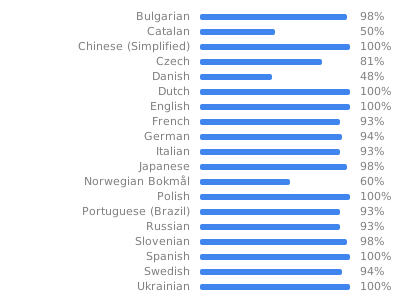](https://hosted.weblate.org/engage/fintunes/)
|
||||
|
||||
## Licensing and Credits
|
||||
This work is licensed under the MIT license and was built by Lei Nelissen.
|
||||
|
||||
|
||||
@@ -0,0 +1,55 @@
|
||||
# To learn about Buck see [Docs](https://buckbuild.com/).
|
||||
# To run your application with Buck:
|
||||
# - install Buck
|
||||
# - `npm start` - to start the packager
|
||||
# - `cd android`
|
||||
# - `keytool -genkey -v -keystore keystores/debug.keystore -storepass android -alias androiddebugkey -keypass android -dname "CN=Android Debug,O=Android,C=US"`
|
||||
# - `./gradlew :app:copyDownloadableDepsToLibs` - make all Gradle compile dependencies available to Buck
|
||||
# - `buck install -r android/app` - compile, install and run application
|
||||
#
|
||||
|
||||
load(":build_defs.bzl", "create_aar_targets", "create_jar_targets")
|
||||
|
||||
lib_deps = []
|
||||
|
||||
create_aar_targets(glob(["libs/*.aar"]))
|
||||
|
||||
create_jar_targets(glob(["libs/*.jar"]))
|
||||
|
||||
android_library(
|
||||
name = "all-libs",
|
||||
exported_deps = lib_deps,
|
||||
)
|
||||
|
||||
android_library(
|
||||
name = "app-code",
|
||||
srcs = glob([
|
||||
"src/main/java/**/*.java",
|
||||
]),
|
||||
deps = [
|
||||
":all-libs",
|
||||
":build_config",
|
||||
":res",
|
||||
],
|
||||
)
|
||||
|
||||
android_build_config(
|
||||
name = "build_config",
|
||||
package = "nl.moeilijkedingen.jellyfinaudioplayer",
|
||||
)
|
||||
|
||||
android_resource(
|
||||
name = "res",
|
||||
package = "nl.moeilijkedingen.jellyfinaudioplayer",
|
||||
res = "src/main/res",
|
||||
)
|
||||
|
||||
android_binary(
|
||||
name = "app",
|
||||
keystore = "//android/keystores:debug",
|
||||
manifest = "src/main/AndroidManifest.xml",
|
||||
package_type = "debug",
|
||||
deps = [
|
||||
":app-code",
|
||||
],
|
||||
)
|
||||
+222
-67
@@ -1,71 +1,101 @@
|
||||
apply plugin: "com.android.application"
|
||||
apply plugin: "com.facebook.react"
|
||||
|
||||
import com.android.build.OutputFile
|
||||
import org.apache.tools.ant.taskdefs.condition.Os
|
||||
|
||||
/**
|
||||
* This is the configuration block to customize your React Native Android app.
|
||||
* By default you don't need to apply any configuration, just uncomment the lines you need.
|
||||
* The react.gradle file registers a task for each build variant (e.g. bundleDebugJsAndAssets
|
||||
* and bundleReleaseJsAndAssets).
|
||||
* These basically call `react-native bundle` with the correct arguments during the Android build
|
||||
* cycle. By default, bundleDebugJsAndAssets is skipped, as in debug/dev mode we prefer to load the
|
||||
* bundle directly from the development server. Below you can see all the possible configurations
|
||||
* and their defaults. If you decide to add a configuration block, make sure to add it before the
|
||||
* `apply from: "../../node_modules/react-native/react.gradle"` line.
|
||||
*
|
||||
* project.ext.react = [
|
||||
* // the name of the generated asset file containing your JS bundle
|
||||
* bundleAssetName: "index.android.bundle",
|
||||
*
|
||||
* // the entry file for bundle generation. If none specified and
|
||||
* // "index.android.js" exists, it will be used. Otherwise "index.js" is
|
||||
* // default. Can be overridden with ENTRY_FILE environment variable.
|
||||
* entryFile: "index.android.js",
|
||||
*
|
||||
* // https://reactnative.dev/docs/performance#enable-the-ram-format
|
||||
* bundleCommand: "ram-bundle",
|
||||
*
|
||||
* // whether to bundle JS and assets in debug mode
|
||||
* bundleInDebug: false,
|
||||
*
|
||||
* // whether to bundle JS and assets in release mode
|
||||
* bundleInRelease: true,
|
||||
*
|
||||
* // whether to bundle JS and assets in another build variant (if configured).
|
||||
* // See http://tools.android.com/tech-docs/new-build-system/user-guide#TOC-Build-Variants
|
||||
* // The configuration property can be in the following formats
|
||||
* // 'bundleIn${productFlavor}${buildType}'
|
||||
* // 'bundleIn${buildType}'
|
||||
* // bundleInFreeDebug: true,
|
||||
* // bundleInPaidRelease: true,
|
||||
* // bundleInBeta: true,
|
||||
*
|
||||
* // whether to disable dev mode in custom build variants (by default only disabled in release)
|
||||
* // for example: to disable dev mode in the staging build type (if configured)
|
||||
* devDisabledInStaging: true,
|
||||
* // The configuration property can be in the following formats
|
||||
* // 'devDisabledIn${productFlavor}${buildType}'
|
||||
* // 'devDisabledIn${buildType}'
|
||||
*
|
||||
* // the root of your project, i.e. where "package.json" lives
|
||||
* root: "../../",
|
||||
*
|
||||
* // where to put the JS bundle asset in debug mode
|
||||
* jsBundleDirDebug: "$buildDir/intermediates/assets/debug",
|
||||
*
|
||||
* // where to put the JS bundle asset in release mode
|
||||
* jsBundleDirRelease: "$buildDir/intermediates/assets/release",
|
||||
*
|
||||
* // where to put drawable resources / React Native assets, e.g. the ones you use via
|
||||
* // require('./image.png')), in debug mode
|
||||
* resourcesDirDebug: "$buildDir/intermediates/res/merged/debug",
|
||||
*
|
||||
* // where to put drawable resources / React Native assets, e.g. the ones you use via
|
||||
* // require('./image.png')), in release mode
|
||||
* resourcesDirRelease: "$buildDir/intermediates/res/merged/release",
|
||||
*
|
||||
* // by default the gradle tasks are skipped if none of the JS files or assets change; this means
|
||||
* // that we don't look at files in android/ or ios/ to determine whether the tasks are up to
|
||||
* // date; if you have any other folders that you want to ignore for performance reasons (gradle
|
||||
* // indexes the entire tree), add them here. Alternatively, if you have JS files in android/
|
||||
* // for example, you might want to remove it from here.
|
||||
* inputExcludes: ["android/**", "ios/**"],
|
||||
*
|
||||
* // override which node gets called and with what additional arguments
|
||||
* nodeExecutableAndArgs: ["node"],
|
||||
*
|
||||
* // supply additional arguments to the packager
|
||||
* extraPackagerArgs: []
|
||||
* ]
|
||||
*/
|
||||
react {
|
||||
/* Folders */
|
||||
// The root of your project, i.e. where "package.json" lives. Default is '..'
|
||||
// root = file("../")
|
||||
// The folder where the react-native NPM package is. Default is ../node_modules/react-native
|
||||
// reactNativeDir = file("../node_modules/react-native")
|
||||
// The folder where the react-native Codegen package is. Default is ../node_modules/react-native-codegen
|
||||
// codegenDir = file("../node_modules/react-native-codegen")
|
||||
// The cli.js file which is the React Native CLI entrypoint. Default is ../node_modules/react-native/cli.js
|
||||
// cliFile = file("../node_modules/react-native/cli.js")
|
||||
|
||||
/* Variants */
|
||||
// The list of variants to that are debuggable. For those we're going to
|
||||
// skip the bundling of the JS bundle and the assets. By default is just 'debug'.
|
||||
// If you add flavors like lite, prod, etc. you'll have to list your debuggableVariants.
|
||||
// debuggableVariants = ["liteDebug", "prodDebug"]
|
||||
project.ext.react = [
|
||||
enableHermes: true, // clean and rebuild if changing
|
||||
]
|
||||
|
||||
/* Bundling */
|
||||
// A list containing the node command and its flags. Default is just 'node'.
|
||||
// nodeExecutableAndArgs = ["node"]
|
||||
//
|
||||
// The command to run when bundling. By default is 'bundle'
|
||||
// bundleCommand = "ram-bundle"
|
||||
//
|
||||
// The path to the CLI configuration file. Default is empty.
|
||||
// bundleConfig = file(../rn-cli.config.js)
|
||||
//
|
||||
// The name of the generated asset file containing your JS bundle
|
||||
// bundleAssetName = "MyApplication.android.bundle"
|
||||
//
|
||||
// The entry file for bundle generation. Default is 'index.android.js' or 'index.js'
|
||||
// entryFile = file("../js/MyApplication.android.js")
|
||||
//
|
||||
// A list of extra flags to pass to the 'bundle' commands.
|
||||
// See https://github.com/react-native-community/cli/blob/main/docs/commands.md#bundle
|
||||
// extraPackagerArgs = []
|
||||
|
||||
/* Hermes Commands */
|
||||
// The hermes compiler command to run. By default it is 'hermesc'
|
||||
// hermesCommand = "$rootDir/my-custom-hermesc/bin/hermesc"
|
||||
//
|
||||
// The list of flags to pass to the Hermes compiler. By default is "-O", "-output-source-map"
|
||||
// hermesFlags = ["-O", "-output-source-map"]
|
||||
}
|
||||
|
||||
if (System.getenv("DISABLE_SENTRY_SOURCEMAP_UPLOAD") != "true") {
|
||||
apply from: "../../node_modules/@sentry/react-native/sentry.gradle"
|
||||
}
|
||||
apply from: "../../node_modules/react-native/react.gradle"
|
||||
|
||||
/**
|
||||
* Set this to true to create four separate APKs instead of one,
|
||||
* one for each native architecture. This is useful if you don't
|
||||
* use App Bundles (https://developer.android.com/guide/app-bundle/)
|
||||
* and want to have separate APKs to upload to the Play Store.
|
||||
* Set this to true to create two separate APKs instead of one:
|
||||
* - An APK that only works on ARM devices
|
||||
* - An APK that only works on x86 devices
|
||||
* The advantage is the size of the APK is reduced by about 4MB.
|
||||
* Upload all the APKs to the Play Store and people will download
|
||||
* the correct one based on the CPU architecture of their device.
|
||||
*/
|
||||
def enableSeparateBuildPerCPUArchitecture = false
|
||||
|
||||
/**
|
||||
* Set this to true to Run Proguard on Release builds to minify the Java bytecode.
|
||||
* Run Proguard to shrink the Java bytecode in release builds.
|
||||
*/
|
||||
def enableProguardInReleaseBuilds = false
|
||||
|
||||
@@ -83,9 +113,16 @@ def enableProguardInReleaseBuilds = false
|
||||
def jscFlavor = 'org.webkit:android-jsc:+'
|
||||
|
||||
/**
|
||||
* Private function to get the list of Native Architectures you want to build.
|
||||
* This reads the value from reactNativeArchitectures in your gradle.properties
|
||||
* file and works together with the --active-arch-only flag of react-native run-android.
|
||||
* Whether to enable the Hermes VM.
|
||||
*
|
||||
* This should be set on project.ext.react and that value will be read here. If it is not set
|
||||
* on project.ext.react, JavaScript will not be compiled to Hermes Bytecode
|
||||
* and the benefits of using Hermes will therefore be sharply reduced.
|
||||
*/
|
||||
def enableHermes = project.ext.react.get("enableHermes", false);
|
||||
|
||||
/**
|
||||
* Architectures to build native code for.
|
||||
*/
|
||||
def reactNativeArchitectures() {
|
||||
def value = project.getProperties().get("reactNativeArchitectures")
|
||||
@@ -97,13 +134,73 @@ android {
|
||||
|
||||
compileSdkVersion rootProject.ext.compileSdkVersion
|
||||
|
||||
namespace "nl.moeilijkedingen.jellyfinaudioplayer"
|
||||
defaultConfig {
|
||||
applicationId "nl.moeilijkedingen.jellyfinaudioplayer"
|
||||
minSdkVersion rootProject.ext.minSdkVersion
|
||||
targetSdkVersion rootProject.ext.targetSdkVersion
|
||||
versionCode 23
|
||||
versionName "2.2.0"
|
||||
versionCode 15
|
||||
versionName "2.0.3"
|
||||
buildConfigField "boolean", "IS_NEW_ARCHITECTURE_ENABLED", isNewArchitectureEnabled().toString()
|
||||
testInstrumentationRunner "androidx.test.runner.AndroidJUnitRunner"
|
||||
|
||||
if (isNewArchitectureEnabled()) {
|
||||
// We configure the CMake build only if you decide to opt-in for the New Architecture.
|
||||
externalNativeBuild {
|
||||
cmake {
|
||||
arguments "-DPROJECT_BUILD_DIR=$buildDir",
|
||||
"-DREACT_ANDROID_DIR=$rootDir/../node_modules/react-native/ReactAndroid",
|
||||
"-DREACT_ANDROID_BUILD_DIR=$rootDir/../node_modules/react-native/ReactAndroid/build",
|
||||
"-DNODE_MODULES_DIR=$rootDir/../node_modules",
|
||||
"-DANDROID_STL=c++_shared"
|
||||
}
|
||||
}
|
||||
if (!enableSeparateBuildPerCPUArchitecture) {
|
||||
ndk {
|
||||
abiFilters (*reactNativeArchitectures())
|
||||
}
|
||||
}
|
||||
}
|
||||
}
|
||||
|
||||
if (isNewArchitectureEnabled()) {
|
||||
// We configure the NDK build only if you decide to opt-in for the New Architecture.
|
||||
externalNativeBuild {
|
||||
cmake {
|
||||
path "$projectDir/src/main/jni/CMakeLists.txt"
|
||||
}
|
||||
}
|
||||
def reactAndroidProjectDir = project(':ReactAndroid').projectDir
|
||||
def packageReactNdkDebugLibs = tasks.register("packageReactNdkDebugLibs", Copy) {
|
||||
dependsOn(":ReactAndroid:packageReactNdkDebugLibsForBuck")
|
||||
from("$reactAndroidProjectDir/src/main/jni/prebuilt/lib")
|
||||
into("$buildDir/react-ndk/exported")
|
||||
}
|
||||
def packageReactNdkReleaseLibs = tasks.register("packageReactNdkReleaseLibs", Copy) {
|
||||
dependsOn(":ReactAndroid:packageReactNdkReleaseLibsForBuck")
|
||||
from("$reactAndroidProjectDir/src/main/jni/prebuilt/lib")
|
||||
into("$buildDir/react-ndk/exported")
|
||||
}
|
||||
afterEvaluate {
|
||||
// If you wish to add a custom TurboModule or component locally,
|
||||
// you should uncomment this line.
|
||||
// preBuild.dependsOn("generateCodegenArtifactsFromSchema")
|
||||
preDebugBuild.dependsOn(packageReactNdkDebugLibs)
|
||||
preReleaseBuild.dependsOn(packageReactNdkReleaseLibs)
|
||||
|
||||
// Due to a bug inside AGP, we have to explicitly set a dependency
|
||||
// between configureCMakeDebug* tasks and the preBuild tasks.
|
||||
// This can be removed once this is solved: https://issuetracker.google.com/issues/207403732
|
||||
configureCMakeRelWithDebInfo.dependsOn(preReleaseBuild)
|
||||
configureCMakeDebug.dependsOn(preDebugBuild)
|
||||
reactNativeArchitectures().each { architecture ->
|
||||
tasks.findByName("configureCMakeDebug[${architecture}]")?.configure {
|
||||
dependsOn("preDebugBuild")
|
||||
}
|
||||
tasks.findByName("configureCMakeRelWithDebInfo[${architecture}]")?.configure {
|
||||
dependsOn("preReleaseBuild")
|
||||
}
|
||||
}
|
||||
}
|
||||
}
|
||||
|
||||
splits {
|
||||
@@ -165,22 +262,80 @@ android {
|
||||
}
|
||||
|
||||
dependencies {
|
||||
// The version of react-native is set by the React Native Gradle Plugin
|
||||
implementation("com.facebook.react:react-android")
|
||||
implementation fileTree(dir: "libs", include: ["*.jar"])
|
||||
|
||||
implementation("androidx.swiperefreshlayout:swiperefreshlayout:1.0.0")
|
||||
//noinspection GradleDynamicVersion
|
||||
implementation "com.facebook.react:react-native:+" // From node_modules
|
||||
|
||||
implementation "androidx.swiperefreshlayout:swiperefreshlayout:1.0.0"
|
||||
|
||||
debugImplementation("com.facebook.flipper:flipper:${FLIPPER_VERSION}") {
|
||||
exclude group:'com.facebook.fbjni'
|
||||
}
|
||||
|
||||
debugImplementation("com.facebook.flipper:flipper:${FLIPPER_VERSION}")
|
||||
debugImplementation("com.facebook.flipper:flipper-network-plugin:${FLIPPER_VERSION}") {
|
||||
exclude group:'com.facebook.flipper'
|
||||
exclude group:'com.squareup.okhttp3', module:'okhttp'
|
||||
}
|
||||
|
||||
debugImplementation("com.facebook.flipper:flipper-fresco-plugin:${FLIPPER_VERSION}")
|
||||
if (hermesEnabled.toBoolean()) {
|
||||
implementation("com.facebook.react:hermes-android")
|
||||
debugImplementation("com.facebook.flipper:flipper-fresco-plugin:${FLIPPER_VERSION}") {
|
||||
exclude group:'com.facebook.flipper'
|
||||
}
|
||||
|
||||
// fastlane screengrab, falcon is a dependency of screengrab
|
||||
androidTestImplementation 'com.jraska:falcon:2.2.0'
|
||||
androidTestImplementation "tools.fastlane:screengrab:2.1.0"
|
||||
// Espresso dependencies
|
||||
androidTestImplementation 'androidx.test.espresso:espresso-core:3.4.0'
|
||||
// Hamcrest library
|
||||
androidTestImplementation 'org.hamcrest:hamcrest-library:1.3'
|
||||
|
||||
// Core library
|
||||
androidTestImplementation 'androidx.test:core:1.4.0'
|
||||
|
||||
// AndroidJUnitRunner and JUnit Rules
|
||||
androidTestImplementation 'androidx.test:runner:1.4.0'
|
||||
androidTestImplementation 'androidx.test:rules:1.4.0'
|
||||
|
||||
if (enableHermes) {
|
||||
//noinspection GradleDynamicVersion
|
||||
implementation("com.facebook.react:hermes-engine:+") { // From node_modules
|
||||
exclude group:'com.facebook.fbjni'
|
||||
}
|
||||
} else {
|
||||
implementation jscFlavor
|
||||
}
|
||||
}
|
||||
|
||||
if (isNewArchitectureEnabled()) {
|
||||
// If new architecture is enabled, we let you build RN from source
|
||||
// Otherwise we fallback to a prebuilt .aar bundled in the NPM package.
|
||||
// This will be applied to all the imported transtitive dependency.
|
||||
configurations.all {
|
||||
resolutionStrategy.dependencySubstitution {
|
||||
substitute(module("com.facebook.react:react-native"))
|
||||
.using(project(":ReactAndroid"))
|
||||
.because("On New Architecture we're building React Native from source")
|
||||
substitute(module("com.facebook.react:hermes-engine"))
|
||||
.using(project(":ReactAndroid:hermes-engine"))
|
||||
.because("On New Architecture we're building Hermes from source")
|
||||
}
|
||||
}
|
||||
}
|
||||
|
||||
// Run this once to be able to run the application with BUCK
|
||||
// puts all compile dependencies into folder libs for BUCK to use
|
||||
task copyDownloadableDepsToLibs(type: Copy) {
|
||||
from configurations.implementation
|
||||
into 'libs'
|
||||
}
|
||||
|
||||
apply from: file("../../node_modules/@react-native-community/cli-platform-android/native_modules.gradle"); applyNativeModulesAppBuildGradle(project)
|
||||
|
||||
def isNewArchitectureEnabled() {
|
||||
// To opt-in for the New Architecture, you can either:
|
||||
// - Set `newArchEnabled` to true inside the `gradle.properties` file
|
||||
// - Invoke gradle with `-newArchEnabled=true`
|
||||
// - Set an environment variable `ORG_GRADLE_PROJECT_newArchEnabled=true`
|
||||
return project.hasProperty("newArchEnabled") && project.newArchEnabled == "true"
|
||||
}
|
||||
|
||||
@@ -0,0 +1,105 @@
|
||||
package nl.moeilijkedingen.jellyfinaudioplayer;
|
||||
|
||||
import androidx.test.rule.ActivityTestRule;
|
||||
|
||||
import nl.moeilijkedingen.jellyfinaudioplayer.R;
|
||||
import org.junit.AfterClass;
|
||||
import org.junit.BeforeClass;
|
||||
import org.junit.ClassRule;
|
||||
import org.junit.Rule;
|
||||
import org.junit.Test;
|
||||
import org.junit.runner.RunWith;
|
||||
import org.junit.runners.JUnit4;
|
||||
import java.util.Arrays;
|
||||
|
||||
import tools.fastlane.screengrab.Screengrab;
|
||||
import tools.fastlane.screengrab.UiAutomatorScreenshotStrategy;
|
||||
import tools.fastlane.screengrab.cleanstatusbar.BluetoothState;
|
||||
import tools.fastlane.screengrab.cleanstatusbar.CleanStatusBar;
|
||||
import tools.fastlane.screengrab.cleanstatusbar.MobileDataType;
|
||||
import tools.fastlane.screengrab.locale.LocaleTestRule;
|
||||
|
||||
import androidx.test.espresso.NoMatchingViewException;
|
||||
|
||||
import static androidx.test.espresso.Espresso.onView;
|
||||
import static androidx.test.espresso.action.ViewActions.click;
|
||||
import static androidx.test.espresso.action.ViewActions.typeText;
|
||||
import static androidx.test.espresso.assertion.ViewAssertions.matches;
|
||||
import static androidx.test.espresso.matcher.ViewMatchers.withContentDescription;
|
||||
import static androidx.test.espresso.matcher.ViewMatchers.isDisplayed;
|
||||
import static androidx.test.espresso.matcher.ViewMatchers.withId;
|
||||
import static androidx.test.espresso.matcher.ViewMatchers.withText;
|
||||
|
||||
import static org.hamcrest.core.AllOf.allOf;
|
||||
|
||||
@RunWith(JUnit4.class)
|
||||
public class ScreenshotTest {
|
||||
@ClassRule
|
||||
public static final LocaleTestRule localeTestRule = new LocaleTestRule();
|
||||
|
||||
@Rule
|
||||
public ActivityTestRule<MainActivity> activityRule = new ActivityTestRule<>(MainActivity.class);
|
||||
|
||||
@BeforeClass
|
||||
public static void beforeAll() {
|
||||
Screengrab.setDefaultScreenshotStrategy(new UiAutomatorScreenshotStrategy());
|
||||
CleanStatusBar.enableWithDefaults();
|
||||
}
|
||||
|
||||
@AfterClass
|
||||
public static void afterAll() {
|
||||
CleanStatusBar.disable();
|
||||
}
|
||||
|
||||
/*
|
||||
Custom wait function. In order to make sure each button press yields a
|
||||
desirable screen, we use the wait function to delay further actions until
|
||||
the current one has achieved its purpose.
|
||||
|
||||
`duration` indicates the amount of milli-seconds to wait. The value of
|
||||
`duration` is acquired by emperical trial-and-error.
|
||||
*/
|
||||
public void wait(int duration) {
|
||||
try {
|
||||
Thread.sleep(duration);
|
||||
} catch (InterruptedException e) {
|
||||
e.printStackTrace();
|
||||
}
|
||||
}
|
||||
|
||||
public void inputText(Integer id, String text) {
|
||||
try {
|
||||
onView(allOf(withId(id))).perform(typeText(text));
|
||||
} catch (NoMatchingViewException e) {
|
||||
e.printStackTrace();
|
||||
}
|
||||
}
|
||||
|
||||
@Test
|
||||
public void testTakeScreenshot() {
|
||||
System.out.println("AVAILABLE IDS:" + Arrays.toString(R.id.class.getFields()));
|
||||
// wait(10000);
|
||||
|
||||
// Screengrab.screenshot("04RecentAlbums");
|
||||
// onView(allOf(withId(R.id.all_albums))).perform(click());
|
||||
// wait(5000);
|
||||
// Screengrab.screenshot("05AlbumsScreen");
|
||||
|
||||
// onView(allOf(withId(R.id.search_tab))).perform(click());
|
||||
// wait(5000);
|
||||
// onView(allOf(withId(R.id.search_input_container))).perform(click());
|
||||
// wait(5000);
|
||||
// onView(allOf(withId(R.id.search_input_textinput))).perform(typeText("bicep"));
|
||||
// wait(5000);
|
||||
|
||||
// onView(allOf(withId(R.id.search_result_a644f8d23821601d2feb86ddae5e64f4))).perform(click());
|
||||
// wait(5000);
|
||||
// Screengrab.screenshot("02AlbumScreen");
|
||||
|
||||
// onView(allOf(withId(R.id.play_album))).perform(click());
|
||||
// wait(5000);
|
||||
// onView(allOf(withId(R.id.open_player_modal))).perform(click());
|
||||
// wait(5000);
|
||||
// Screengrab.screenshot("01PlayModal");
|
||||
}
|
||||
}
|
||||
@@ -3,6 +3,18 @@
|
||||
xmlns:tools="http://schemas.android.com/tools">
|
||||
|
||||
<uses-permission android:name="android.permission.SYSTEM_ALERT_WINDOW"/>
|
||||
<uses-permission android:name="android.permission.DUMP"/>
|
||||
|
||||
<!-- Allows unlocking your device and activating its screen so UI tests can succeed -->
|
||||
<uses-permission android:name="android.permission.DISABLE_KEYGUARD"/>
|
||||
<uses-permission android:name="android.permission.WAKE_LOCK"/>
|
||||
|
||||
<!-- Allows for storing and retrieving screenshots -->
|
||||
<uses-permission android:name="android.permission.WRITE_EXTERNAL_STORAGE" />
|
||||
<uses-permission android:name="android.permission.READ_EXTERNAL_STORAGE" />
|
||||
|
||||
<!-- Allows changing locales -->
|
||||
<uses-permission android:name="android.permission.CHANGE_CONFIGURATION" />
|
||||
|
||||
<application
|
||||
android:networkSecurityConfig="@xml/react_native_config"
|
||||
|
||||
@@ -17,6 +17,7 @@ import com.facebook.flipper.plugins.inspector.DescriptorMapping;
|
||||
import com.facebook.flipper.plugins.inspector.InspectorFlipperPlugin;
|
||||
import com.facebook.flipper.plugins.network.FlipperOkhttpInterceptor;
|
||||
import com.facebook.flipper.plugins.network.NetworkFlipperPlugin;
|
||||
import com.facebook.flipper.plugins.react.ReactFlipperPlugin;
|
||||
import com.facebook.flipper.plugins.sharedpreferences.SharedPreferencesFlipperPlugin;
|
||||
import com.facebook.react.ReactInstanceEventListener;
|
||||
import com.facebook.react.ReactInstanceManager;
|
||||
@@ -24,16 +25,13 @@ import com.facebook.react.bridge.ReactContext;
|
||||
import com.facebook.react.modules.network.NetworkingModule;
|
||||
import okhttp3.OkHttpClient;
|
||||
|
||||
/**
|
||||
* Class responsible of loading Flipper inside your React Native application. This is the debug
|
||||
* flavor of it. Here you can add your own plugins and customize the Flipper setup.
|
||||
*/
|
||||
public class ReactNativeFlipper {
|
||||
public static void initializeFlipper(Context context, ReactInstanceManager reactInstanceManager) {
|
||||
if (FlipperUtils.shouldEnableFlipper(context)) {
|
||||
final FlipperClient client = AndroidFlipperClient.getInstance(context);
|
||||
|
||||
client.addPlugin(new InspectorFlipperPlugin(context, DescriptorMapping.withDefaults()));
|
||||
client.addPlugin(new ReactFlipperPlugin());
|
||||
client.addPlugin(new DatabasesFlipperPlugin(context));
|
||||
client.addPlugin(new SharedPreferencesFlipperPlugin(context));
|
||||
client.addPlugin(CrashReporterPlugin.getInstance());
|
||||
|
||||
@@ -1,4 +1,5 @@
|
||||
<manifest xmlns:android="http://schemas.android.com/apk/res/android">
|
||||
<manifest xmlns:android="http://schemas.android.com/apk/res/android"
|
||||
package="nl.moeilijkedingen.jellyfinaudioplayer">
|
||||
|
||||
<uses-permission android:name="android.permission.INTERNET" />
|
||||
|
||||
|
||||
@@ -1,9 +1,8 @@
|
||||
package nl.moeilijkedingen.jellyfinaudioplayer;
|
||||
package nl.moeilijkedingen.jellyfinaudioplayer;;
|
||||
|
||||
import com.facebook.react.ReactActivity;
|
||||
import com.facebook.react.ReactActivityDelegate;
|
||||
import com.facebook.react.defaults.DefaultNewArchitectureEntryPoint;
|
||||
import com.facebook.react.defaults.DefaultReactActivityDelegate;
|
||||
import com.facebook.react.ReactRootView;
|
||||
|
||||
public class MainActivity extends ReactActivity {
|
||||
|
||||
@@ -17,19 +16,33 @@ public class MainActivity extends ReactActivity {
|
||||
}
|
||||
|
||||
/**
|
||||
* Returns the instance of the {@link ReactActivityDelegate}. Here we use a util class {@link
|
||||
* DefaultReactActivityDelegate} which allows you to easily enable Fabric and Concurrent React
|
||||
* (aka React 18) with two boolean flags.
|
||||
* Returns the instance of the {@link ReactActivityDelegate}. There the RootView is created and
|
||||
* you can specify the renderer you wish to use - the new renderer (Fabric) or the old renderer
|
||||
* (Paper).
|
||||
*/
|
||||
@Override
|
||||
protected ReactActivityDelegate createReactActivityDelegate() {
|
||||
return new DefaultReactActivityDelegate(
|
||||
this,
|
||||
getMainComponentName(),
|
||||
// If you opted-in for the New Architecture, we enable the Fabric Renderer.
|
||||
DefaultNewArchitectureEntryPoint.getFabricEnabled(), // fabricEnabled
|
||||
// If you opted-in for the New Architecture, we enable Concurrent React (i.e. React 18).
|
||||
DefaultNewArchitectureEntryPoint.getConcurrentReactEnabled() // concurrentRootEnabled
|
||||
);
|
||||
return new MainActivityDelegate(this, getMainComponentName());
|
||||
}
|
||||
|
||||
public static class MainActivityDelegate extends ReactActivityDelegate {
|
||||
public MainActivityDelegate(ReactActivity activity, String mainComponentName) {
|
||||
super(activity, mainComponentName);
|
||||
}
|
||||
|
||||
@Override
|
||||
protected ReactRootView createRootView() {
|
||||
ReactRootView reactRootView = new ReactRootView(getContext());
|
||||
// If you opted-in for the New Architecture, we enable the Fabric Renderer.
|
||||
reactRootView.setIsFabric(BuildConfig.IS_NEW_ARCHITECTURE_ENABLED);
|
||||
return reactRootView;
|
||||
}
|
||||
|
||||
@Override
|
||||
protected boolean isConcurrentRootEnabled() {
|
||||
// If you opted-in for the New Architecture, we enable Concurrent Root (i.e. React 18).
|
||||
// More on this on https://reactjs.org/blog/2022/03/29/react-v18.html
|
||||
return BuildConfig.IS_NEW_ARCHITECTURE_ENABLED;
|
||||
}
|
||||
}
|
||||
}
|
||||
@@ -1,19 +1,23 @@
|
||||
package nl.moeilijkedingen.jellyfinaudioplayer;
|
||||
|
||||
import android.app.Application;
|
||||
import android.content.Context;
|
||||
import com.facebook.react.PackageList;
|
||||
import com.facebook.react.ReactApplication;
|
||||
import com.facebook.react.ReactInstanceManager;
|
||||
import com.facebook.react.ReactNativeHost;
|
||||
import com.facebook.react.ReactPackage;
|
||||
import com.facebook.react.defaults.DefaultNewArchitectureEntryPoint;
|
||||
import com.facebook.react.defaults.DefaultReactNativeHost;
|
||||
import com.facebook.soloader.SoLoader;
|
||||
import java.lang.reflect.InvocationTargetException;
|
||||
import java.util.List;
|
||||
|
||||
import com.facebook.react.bridge.JSIModulePackage;
|
||||
import com.swmansion.reanimated.ReanimatedJSIModulePackage;
|
||||
|
||||
public class MainApplication extends Application implements ReactApplication {
|
||||
|
||||
private final ReactNativeHost mReactNativeHost =
|
||||
new DefaultReactNativeHost(this) {
|
||||
new ReactNativeHost(this) {
|
||||
@Override
|
||||
public boolean getUseDeveloperSupport() {
|
||||
return BuildConfig.DEBUG;
|
||||
@@ -34,13 +38,8 @@ public class MainApplication extends Application implements ReactApplication {
|
||||
}
|
||||
|
||||
@Override
|
||||
protected boolean isNewArchEnabled() {
|
||||
return BuildConfig.IS_NEW_ARCHITECTURE_ENABLED;
|
||||
}
|
||||
|
||||
@Override
|
||||
protected Boolean isHermesEnabled() {
|
||||
return BuildConfig.IS_HERMES_ENABLED;
|
||||
protected JSIModulePackage getJSIModulePackage() {
|
||||
return new ReanimatedJSIModulePackage();
|
||||
}
|
||||
};
|
||||
|
||||
@@ -53,10 +52,37 @@ public class MainApplication extends Application implements ReactApplication {
|
||||
public void onCreate() {
|
||||
super.onCreate();
|
||||
SoLoader.init(this, /* native exopackage */ false);
|
||||
if (BuildConfig.IS_NEW_ARCHITECTURE_ENABLED) {
|
||||
// If you opted-in for the New Architecture, we load the native entry point for this app.
|
||||
DefaultNewArchitectureEntryPoint.load();
|
||||
initializeFlipper(this, getReactNativeHost().getReactInstanceManager());
|
||||
}
|
||||
|
||||
/**
|
||||
* Loads Flipper in React Native templates. Call this in the onCreate method with something like
|
||||
* initializeFlipper(this, getReactNativeHost().getReactInstanceManager());
|
||||
*
|
||||
* @param context
|
||||
* @param reactInstanceManager
|
||||
*/
|
||||
private static void initializeFlipper(
|
||||
Context context, ReactInstanceManager reactInstanceManager) {
|
||||
if (BuildConfig.DEBUG) {
|
||||
try {
|
||||
/*
|
||||
We use reflection here to pick up the class that initializes Flipper,
|
||||
since Flipper library is not available in release mode
|
||||
*/
|
||||
Class<?> aClass = Class.forName("nl.moeilijkedingen.jellyfinaudioplayer.ReactNativeFlipper");
|
||||
aClass
|
||||
.getMethod("initializeFlipper", Context.class, ReactInstanceManager.class)
|
||||
.invoke(null, context, reactInstanceManager);
|
||||
} catch (ClassNotFoundException e) {
|
||||
e.printStackTrace();
|
||||
} catch (NoSuchMethodException e) {
|
||||
e.printStackTrace();
|
||||
} catch (IllegalAccessException e) {
|
||||
e.printStackTrace();
|
||||
} catch (InvocationTargetException e) {
|
||||
e.printStackTrace();
|
||||
}
|
||||
}
|
||||
ReactNativeFlipper.initializeFlipper(this, getReactNativeHost().getReactInstanceManager());
|
||||
}
|
||||
}
|
||||
|
||||
@@ -0,0 +1,7 @@
|
||||
cmake_minimum_required(VERSION 3.13)
|
||||
|
||||
# Define the library name here.
|
||||
project(rndiffapp_appmodules)
|
||||
|
||||
# This file includes all the necessary to let you build your application with the New Architecture.
|
||||
include(${REACT_ANDROID_DIR}/cmake-utils/ReactNative-application.cmake)
|
||||
@@ -0,0 +1,32 @@
|
||||
#include "MainApplicationModuleProvider.h"
|
||||
|
||||
#include <rncli.h>
|
||||
#include <rncore.h>
|
||||
|
||||
namespace facebook {
|
||||
namespace react {
|
||||
|
||||
std::shared_ptr<TurboModule> MainApplicationModuleProvider(
|
||||
const std::string &moduleName,
|
||||
const JavaTurboModule::InitParams ¶ms) {
|
||||
// Here you can provide your own module provider for TurboModules coming from
|
||||
// either your application or from external libraries. The approach to follow
|
||||
// is similar to the following (for a library called `samplelibrary`:
|
||||
//
|
||||
// auto module = samplelibrary_ModuleProvider(moduleName, params);
|
||||
// if (module != nullptr) {
|
||||
// return module;
|
||||
// }
|
||||
// return rncore_ModuleProvider(moduleName, params);
|
||||
|
||||
// Module providers autolinked by RN CLI
|
||||
auto rncli_module = rncli_ModuleProvider(moduleName, params);
|
||||
if (rncli_module != nullptr) {
|
||||
return rncli_module;
|
||||
}
|
||||
|
||||
return rncore_ModuleProvider(moduleName, params);
|
||||
}
|
||||
|
||||
} // namespace react
|
||||
} // namespace facebook
|
||||
@@ -0,0 +1,16 @@
|
||||
#pragma once
|
||||
|
||||
#include <memory>
|
||||
#include <string>
|
||||
|
||||
#include <ReactCommon/JavaTurboModule.h>
|
||||
|
||||
namespace facebook {
|
||||
namespace react {
|
||||
|
||||
std::shared_ptr<TurboModule> MainApplicationModuleProvider(
|
||||
const std::string &moduleName,
|
||||
const JavaTurboModule::InitParams ¶ms);
|
||||
|
||||
} // namespace react
|
||||
} // namespace facebook
|
||||
@@ -0,0 +1,45 @@
|
||||
#include "MainApplicationTurboModuleManagerDelegate.h"
|
||||
#include "MainApplicationModuleProvider.h"
|
||||
|
||||
namespace facebook {
|
||||
namespace react {
|
||||
|
||||
jni::local_ref<MainApplicationTurboModuleManagerDelegate::jhybriddata>
|
||||
MainApplicationTurboModuleManagerDelegate::initHybrid(
|
||||
jni::alias_ref<jhybridobject>) {
|
||||
return makeCxxInstance();
|
||||
}
|
||||
|
||||
void MainApplicationTurboModuleManagerDelegate::registerNatives() {
|
||||
registerHybrid({
|
||||
makeNativeMethod(
|
||||
"initHybrid", MainApplicationTurboModuleManagerDelegate::initHybrid),
|
||||
makeNativeMethod(
|
||||
"canCreateTurboModule",
|
||||
MainApplicationTurboModuleManagerDelegate::canCreateTurboModule),
|
||||
});
|
||||
}
|
||||
|
||||
std::shared_ptr<TurboModule>
|
||||
MainApplicationTurboModuleManagerDelegate::getTurboModule(
|
||||
const std::string &name,
|
||||
const std::shared_ptr<CallInvoker> &jsInvoker) {
|
||||
// Not implemented yet: provide pure-C++ NativeModules here.
|
||||
return nullptr;
|
||||
}
|
||||
|
||||
std::shared_ptr<TurboModule>
|
||||
MainApplicationTurboModuleManagerDelegate::getTurboModule(
|
||||
const std::string &name,
|
||||
const JavaTurboModule::InitParams ¶ms) {
|
||||
return MainApplicationModuleProvider(name, params);
|
||||
}
|
||||
|
||||
bool MainApplicationTurboModuleManagerDelegate::canCreateTurboModule(
|
||||
const std::string &name) {
|
||||
return getTurboModule(name, nullptr) != nullptr ||
|
||||
getTurboModule(name, {.moduleName = name}) != nullptr;
|
||||
}
|
||||
|
||||
} // namespace react
|
||||
} // namespace facebook
|
||||
@@ -0,0 +1,38 @@
|
||||
#include <memory>
|
||||
#include <string>
|
||||
|
||||
#include <ReactCommon/TurboModuleManagerDelegate.h>
|
||||
#include <fbjni/fbjni.h>
|
||||
|
||||
namespace facebook {
|
||||
namespace react {
|
||||
|
||||
class MainApplicationTurboModuleManagerDelegate
|
||||
: public jni::HybridClass<
|
||||
MainApplicationTurboModuleManagerDelegate,
|
||||
TurboModuleManagerDelegate> {
|
||||
public:
|
||||
// Adapt it to the package you used for your Java class.
|
||||
static constexpr auto kJavaDescriptor =
|
||||
"Lcom/rndiffapp/newarchitecture/modules/MainApplicationTurboModuleManagerDelegate;";
|
||||
|
||||
static jni::local_ref<jhybriddata> initHybrid(jni::alias_ref<jhybridobject>);
|
||||
|
||||
static void registerNatives();
|
||||
|
||||
std::shared_ptr<TurboModule> getTurboModule(
|
||||
const std::string &name,
|
||||
const std::shared_ptr<CallInvoker> &jsInvoker) override;
|
||||
std::shared_ptr<TurboModule> getTurboModule(
|
||||
const std::string &name,
|
||||
const JavaTurboModule::InitParams ¶ms) override;
|
||||
|
||||
/**
|
||||
* Test-only method. Allows user to verify whether a TurboModule can be
|
||||
* created by instances of this class.
|
||||
*/
|
||||
bool canCreateTurboModule(const std::string &name);
|
||||
};
|
||||
|
||||
} // namespace react
|
||||
} // namespace facebook
|
||||
@@ -0,0 +1,65 @@
|
||||
#include "MainComponentsRegistry.h"
|
||||
|
||||
#include <CoreComponentsRegistry.h>
|
||||
#include <fbjni/fbjni.h>
|
||||
#include <react/renderer/componentregistry/ComponentDescriptorProviderRegistry.h>
|
||||
#include <react/renderer/components/rncore/ComponentDescriptors.h>
|
||||
#include <rncli.h>
|
||||
|
||||
namespace facebook {
|
||||
namespace react {
|
||||
|
||||
MainComponentsRegistry::MainComponentsRegistry(ComponentFactory *delegate) {}
|
||||
|
||||
std::shared_ptr<ComponentDescriptorProviderRegistry const>
|
||||
MainComponentsRegistry::sharedProviderRegistry() {
|
||||
auto providerRegistry = CoreComponentsRegistry::sharedProviderRegistry();
|
||||
|
||||
// Autolinked providers registered by RN CLI
|
||||
rncli_registerProviders(providerRegistry);
|
||||
|
||||
// Custom Fabric Components go here. You can register custom
|
||||
// components coming from your App or from 3rd party libraries here.
|
||||
//
|
||||
// providerRegistry->add(concreteComponentDescriptorProvider<
|
||||
// AocViewerComponentDescriptor>());
|
||||
return providerRegistry;
|
||||
}
|
||||
|
||||
jni::local_ref<MainComponentsRegistry::jhybriddata>
|
||||
MainComponentsRegistry::initHybrid(
|
||||
jni::alias_ref<jclass>,
|
||||
ComponentFactory *delegate) {
|
||||
auto instance = makeCxxInstance(delegate);
|
||||
|
||||
auto buildRegistryFunction =
|
||||
[](EventDispatcher::Weak const &eventDispatcher,
|
||||
ContextContainer::Shared const &contextContainer)
|
||||
-> ComponentDescriptorRegistry::Shared {
|
||||
auto registry = MainComponentsRegistry::sharedProviderRegistry()
|
||||
->createComponentDescriptorRegistry(
|
||||
{eventDispatcher, contextContainer});
|
||||
|
||||
auto mutableRegistry =
|
||||
std::const_pointer_cast<ComponentDescriptorRegistry>(registry);
|
||||
|
||||
mutableRegistry->setFallbackComponentDescriptor(
|
||||
std::make_shared<UnimplementedNativeViewComponentDescriptor>(
|
||||
ComponentDescriptorParameters{
|
||||
eventDispatcher, contextContainer, nullptr}));
|
||||
|
||||
return registry;
|
||||
};
|
||||
|
||||
delegate->buildRegistryFunction = buildRegistryFunction;
|
||||
return instance;
|
||||
}
|
||||
|
||||
void MainComponentsRegistry::registerNatives() {
|
||||
registerHybrid({
|
||||
makeNativeMethod("initHybrid", MainComponentsRegistry::initHybrid),
|
||||
});
|
||||
}
|
||||
|
||||
} // namespace react
|
||||
} // namespace facebook
|
||||
@@ -0,0 +1,32 @@
|
||||
#pragma once
|
||||
|
||||
#include <ComponentFactory.h>
|
||||
#include <fbjni/fbjni.h>
|
||||
#include <react/renderer/componentregistry/ComponentDescriptorProviderRegistry.h>
|
||||
#include <react/renderer/componentregistry/ComponentDescriptorRegistry.h>
|
||||
|
||||
namespace facebook {
|
||||
namespace react {
|
||||
|
||||
class MainComponentsRegistry
|
||||
: public facebook::jni::HybridClass<MainComponentsRegistry> {
|
||||
public:
|
||||
// Adapt it to the package you used for your Java class.
|
||||
constexpr static auto kJavaDescriptor =
|
||||
"Lcom/rndiffapp/newarchitecture/components/MainComponentsRegistry;";
|
||||
|
||||
static void registerNatives();
|
||||
|
||||
MainComponentsRegistry(ComponentFactory *delegate);
|
||||
|
||||
private:
|
||||
static std::shared_ptr<ComponentDescriptorProviderRegistry const>
|
||||
sharedProviderRegistry();
|
||||
|
||||
static jni::local_ref<jhybriddata> initHybrid(
|
||||
jni::alias_ref<jclass>,
|
||||
ComponentFactory *delegate);
|
||||
};
|
||||
|
||||
} // namespace react
|
||||
} // namespace facebook
|
||||
@@ -0,0 +1,11 @@
|
||||
#include <fbjni/fbjni.h>
|
||||
#include "MainApplicationTurboModuleManagerDelegate.h"
|
||||
#include "MainComponentsRegistry.h"
|
||||
|
||||
JNIEXPORT jint JNICALL JNI_OnLoad(JavaVM *vm, void *) {
|
||||
return facebook::jni::initialize(vm, [] {
|
||||
facebook::react::MainApplicationTurboModuleManagerDelegate::
|
||||
registerNatives();
|
||||
facebook::react::MainComponentsRegistry::registerNatives();
|
||||
});
|
||||
}
|
||||
@@ -1,20 +0,0 @@
|
||||
/**
|
||||
* Copyright (c) Meta Platforms, Inc. and affiliates.
|
||||
*
|
||||
* <p>This source code is licensed under the MIT license found in the LICENSE file in the root
|
||||
* directory of this source tree.
|
||||
*/
|
||||
package nl.moeilijkedingen.jellyfinaudioplayer;
|
||||
|
||||
import android.content.Context;
|
||||
import com.facebook.react.ReactInstanceManager;
|
||||
|
||||
/**
|
||||
* Class responsible of loading Flipper inside your React Native application. This is the release
|
||||
* flavor of it so it's empty as we don't want to load Flipper.
|
||||
*/
|
||||
public class ReactNativeFlipper {
|
||||
public static void initializeFlipper(Context context, ReactInstanceManager reactInstanceManager) {
|
||||
// Do nothing as we don't want to initialize Flipper on Release.
|
||||
}
|
||||
}
|
||||
+37
-3
@@ -10,15 +10,49 @@ buildscript {
|
||||
compileSdkVersion = 33
|
||||
targetSdkVersion = 33
|
||||
|
||||
// We use NDK 23 which has both M1 support and is the side-by-side NDK version from AGP.
|
||||
ndkVersion = "23.1.7779620"
|
||||
if (System.properties['os.arch'] == "aarch64") {
|
||||
// For M1 Users we need to use the NDK 24 which added support for aarch64
|
||||
ndkVersion = "24.0.8215888"
|
||||
} else if (Os.isFamily(Os.FAMILY_WINDOWS)) {
|
||||
// For Android Users, we need to use NDK 23, otherwise the build will
|
||||
// fail due to paths longer than the OS limit
|
||||
ndkVersion = "23.1.7779620"
|
||||
} else {
|
||||
// Otherwise we default to the side-by-side NDK version from AGP.
|
||||
ndkVersion = "21.4.7075529"
|
||||
}
|
||||
}
|
||||
repositories {
|
||||
google()
|
||||
mavenCentral()
|
||||
}
|
||||
dependencies {
|
||||
classpath("com.android.tools.build:gradle:7.3.1")
|
||||
classpath("com.android.tools.build:gradle:7.2.1")
|
||||
classpath("com.facebook.react:react-native-gradle-plugin")
|
||||
classpath("de.undercouch:gradle-download-task:5.0.1")
|
||||
// NOTE: Do not place your application dependencies here; they belong
|
||||
// in the individual module build.gradle files
|
||||
}
|
||||
}
|
||||
|
||||
allprojects {
|
||||
repositories {
|
||||
maven {
|
||||
// All of React Native (JS, Obj-C sources, Android binaries) is installed from npm
|
||||
url("$rootDir/../node_modules/react-native/android")
|
||||
}
|
||||
maven {
|
||||
// Android JSC is installed from npm
|
||||
url("$rootDir/../node_modules/jsc-android/dist")
|
||||
}
|
||||
mavenCentral {
|
||||
// We don't want to fetch react-native from Maven Central as there are
|
||||
// older versions over there.
|
||||
content {
|
||||
excludeGroup "com.facebook.react"
|
||||
}
|
||||
}
|
||||
google()
|
||||
maven { url 'https://www.jitpack.io' }
|
||||
}
|
||||
}
|
||||
@@ -10,7 +10,7 @@
|
||||
# Specifies the JVM arguments used for the daemon process.
|
||||
# The setting is particularly useful for tweaking memory settings.
|
||||
# Default value: -Xmx512m -XX:MaxMetaspaceSize=256m
|
||||
org.gradle.jvmargs=-Xmx2048m -XX:MaxMetaspaceSize=512m
|
||||
org.gradle.jvmargs=-Xmx4096m -XX:MaxMetaspaceSize=512m
|
||||
|
||||
# When configured, Gradle will run in incubating parallel mode.
|
||||
# This option should only be used with decoupled projects. More details, visit
|
||||
@@ -37,8 +37,4 @@ reactNativeArchitectures=armeabi-v7a,arm64-v8a,x86,x86_64
|
||||
# your application. You should enable this flag either if you want
|
||||
# to write custom TurboModules/Fabric components OR use libraries that
|
||||
# are providing them.
|
||||
newArchEnabled=false
|
||||
|
||||
# Use this property to enable or disable the Hermes JS engine.
|
||||
# If set to false, you will be using JSC instead.
|
||||
hermesEnabled=true
|
||||
newArchEnabled=false
|
||||
@@ -2,3 +2,10 @@ rootProject.name = 'Fintunes'
|
||||
apply from: file("../node_modules/@react-native-community/cli-platform-android/native_modules.gradle"); applyNativeModulesSettingsGradle(settings)
|
||||
include ':app'
|
||||
includeBuild('../node_modules/react-native-gradle-plugin')
|
||||
|
||||
if (settings.hasProperty("newArchEnabled") && settings.newArchEnabled == "true") {
|
||||
include(":ReactAndroid")
|
||||
project(":ReactAndroid").projectDir = file('../node_modules/react-native/ReactAndroid')
|
||||
include(":ReactAndroid:hermes-engine")
|
||||
project(":ReactAndroid:hermes-engine").projectDir = file('../node_modules/react-native/ReactAndroid/hermes-engine')
|
||||
}
|
||||
|
||||
+7
-1
@@ -19,7 +19,13 @@ module.exports = {
|
||||
'.json',
|
||||
],
|
||||
alias: {
|
||||
'@': './src',
|
||||
store: './src/store',
|
||||
components: './src/components',
|
||||
utility: './src/utility',
|
||||
screens: './src/screens',
|
||||
assets: './src/assets',
|
||||
'@localisation': './src/localisation',
|
||||
CONSTANTS: './src/CONSTANTS',
|
||||
}
|
||||
}
|
||||
],
|
||||
|
||||

@@ -1,46 +0,0 @@
|
||||
<svg id="livetype" xmlns="http://www.w3.org/2000/svg" width="119.66407" height="40" viewBox="0 0 119.66407 40">
|
||||
<title>Download_on_the_App_Store_Badge_US-UK_RGB_blk_4SVG_092917</title>
|
||||
<g>
|
||||
<g>
|
||||
<g>
|
||||
<path d="M110.13477,0H9.53468c-.3667,0-.729,0-1.09473.002-.30615.002-.60986.00781-.91895.0127A13.21476,13.21476,0,0,0,5.5171.19141a6.66509,6.66509,0,0,0-1.90088.627A6.43779,6.43779,0,0,0,1.99757,1.99707,6.25844,6.25844,0,0,0,.81935,3.61816a6.60119,6.60119,0,0,0-.625,1.90332,12.993,12.993,0,0,0-.1792,2.002C.00587,7.83008.00489,8.1377,0,8.44434V31.5586c.00489.3105.00587.6113.01515.9219a12.99232,12.99232,0,0,0,.1792,2.0019,6.58756,6.58756,0,0,0,.625,1.9043A6.20778,6.20778,0,0,0,1.99757,38.001a6.27445,6.27445,0,0,0,1.61865,1.1787,6.70082,6.70082,0,0,0,1.90088.6308,13.45514,13.45514,0,0,0,2.0039.1768c.30909.0068.6128.0107.91895.0107C8.80567,40,9.168,40,9.53468,40H110.13477c.3594,0,.7246,0,1.084-.002.3047,0,.6172-.0039.9219-.0107a13.279,13.279,0,0,0,2-.1768,6.80432,6.80432,0,0,0,1.9082-.6308,6.27742,6.27742,0,0,0,1.6172-1.1787,6.39482,6.39482,0,0,0,1.1816-1.6143,6.60413,6.60413,0,0,0,.6191-1.9043,13.50643,13.50643,0,0,0,.1856-2.0019c.0039-.3106.0039-.6114.0039-.9219.0078-.3633.0078-.7246.0078-1.0938V9.53613c0-.36621,0-.72949-.0078-1.09179,0-.30664,0-.61426-.0039-.9209a13.5071,13.5071,0,0,0-.1856-2.002,6.6177,6.6177,0,0,0-.6191-1.90332,6.46619,6.46619,0,0,0-2.7988-2.7998,6.76754,6.76754,0,0,0-1.9082-.627,13.04394,13.04394,0,0,0-2-.17676c-.3047-.00488-.6172-.01074-.9219-.01269-.3594-.002-.7246-.002-1.084-.002Z" style="fill: #a6a6a6"/>
|
||||
<path d="M8.44483,39.125c-.30468,0-.602-.0039-.90429-.0107a12.68714,12.68714,0,0,1-1.86914-.1631,5.88381,5.88381,0,0,1-1.65674-.5479,5.40573,5.40573,0,0,1-1.397-1.0166,5.32082,5.32082,0,0,1-1.02051-1.3965,5.72186,5.72186,0,0,1-.543-1.6572,12.41351,12.41351,0,0,1-.1665-1.875c-.00634-.2109-.01464-.9131-.01464-.9131V8.44434S.88185,7.75293.8877,7.5498a12.37039,12.37039,0,0,1,.16553-1.87207,5.7555,5.7555,0,0,1,.54346-1.6621A5.37349,5.37349,0,0,1,2.61183,2.61768,5.56543,5.56543,0,0,1,4.01417,1.59521a5.82309,5.82309,0,0,1,1.65332-.54394A12.58589,12.58589,0,0,1,7.543.88721L8.44532.875H111.21387l.9131.0127a12.38493,12.38493,0,0,1,1.8584.16259,5.93833,5.93833,0,0,1,1.6709.54785,5.59374,5.59374,0,0,1,2.415,2.41993,5.76267,5.76267,0,0,1,.5352,1.64892,12.995,12.995,0,0,1,.1738,1.88721c.0029.2832.0029.5874.0029.89014.0079.375.0079.73193.0079,1.09179V30.4648c0,.3633,0,.7178-.0079,1.0752,0,.3252,0,.6231-.0039.9297a12.73126,12.73126,0,0,1-.1709,1.8535,5.739,5.739,0,0,1-.54,1.67,5.48029,5.48029,0,0,1-1.0156,1.3857,5.4129,5.4129,0,0,1-1.3994,1.0225,5.86168,5.86168,0,0,1-1.668.5498,12.54218,12.54218,0,0,1-1.8692.1631c-.2929.0068-.5996.0107-.8974.0107l-1.084.002Z"/>
|
||||
</g>
|
||||
<g id="_Group_" data-name="<Group>">
|
||||
<g id="_Group_2" data-name="<Group>">
|
||||
<g id="_Group_3" data-name="<Group>">
|
||||
<path id="_Path_" data-name="<Path>" d="M24.76888,20.30068a4.94881,4.94881,0,0,1,2.35656-4.15206,5.06566,5.06566,0,0,0-3.99116-2.15768c-1.67924-.17626-3.30719,1.00483-4.1629,1.00483-.87227,0-2.18977-.98733-3.6085-.95814a5.31529,5.31529,0,0,0-4.47292,2.72787c-1.934,3.34842-.49141,8.26947,1.3612,10.97608.9269,1.32535,2.01018,2.8058,3.42763,2.7533,1.38706-.05753,1.9051-.88448,3.5794-.88448,1.65876,0,2.14479.88448,3.591.8511,1.48838-.02416,2.42613-1.33124,3.32051-2.66914a10.962,10.962,0,0,0,1.51842-3.09251A4.78205,4.78205,0,0,1,24.76888,20.30068Z" style="fill: #fff"/>
|
||||
<path id="_Path_2" data-name="<Path>" d="M22.03725,12.21089a4.87248,4.87248,0,0,0,1.11452-3.49062,4.95746,4.95746,0,0,0-3.20758,1.65961,4.63634,4.63634,0,0,0-1.14371,3.36139A4.09905,4.09905,0,0,0,22.03725,12.21089Z" style="fill: #fff"/>
|
||||
</g>
|
||||
</g>
|
||||
<g>
|
||||
<path d="M42.30227,27.13965h-4.7334l-1.13672,3.35645H34.42727l4.4834-12.418h2.083l4.4834,12.418H43.438ZM38.0591,25.59082h3.752l-1.84961-5.44727h-.05176Z" style="fill: #fff"/>
|
||||
<path d="M55.15969,25.96973c0,2.81348-1.50586,4.62109-3.77832,4.62109a3.0693,3.0693,0,0,1-2.84863-1.584h-.043v4.48438h-1.8584V21.44238H48.4302v1.50586h.03418a3.21162,3.21162,0,0,1,2.88281-1.60059C53.645,21.34766,55.15969,23.16406,55.15969,25.96973Zm-1.91016,0c0-1.833-.94727-3.03809-2.39258-3.03809-1.41992,0-2.375,1.23047-2.375,3.03809,0,1.82422.95508,3.0459,2.375,3.0459C52.30227,29.01563,53.24953,27.81934,53.24953,25.96973Z" style="fill: #fff"/>
|
||||
<path d="M65.12453,25.96973c0,2.81348-1.50586,4.62109-3.77832,4.62109a3.0693,3.0693,0,0,1-2.84863-1.584h-.043v4.48438h-1.8584V21.44238H58.395v1.50586h.03418A3.21162,3.21162,0,0,1,61.312,21.34766C63.60988,21.34766,65.12453,23.16406,65.12453,25.96973Zm-1.91016,0c0-1.833-.94727-3.03809-2.39258-3.03809-1.41992,0-2.375,1.23047-2.375,3.03809,0,1.82422.95508,3.0459,2.375,3.0459C62.26711,29.01563,63.21438,27.81934,63.21438,25.96973Z" style="fill: #fff"/>
|
||||
<path d="M71.71047,27.03613c.1377,1.23145,1.334,2.04,2.96875,2.04,1.56641,0,2.69336-.80859,2.69336-1.91895,0-.96387-.67969-1.541-2.28906-1.93652l-1.60937-.3877c-2.28027-.55078-3.33887-1.61719-3.33887-3.34766,0-2.14258,1.86719-3.61426,4.51855-3.61426,2.624,0,4.42285,1.47168,4.4834,3.61426h-1.876c-.1123-1.23926-1.13672-1.9873-2.63379-1.9873s-2.52148.75684-2.52148,1.8584c0,.87793.6543,1.39453,2.25488,1.79l1.36816.33594c2.54785.60254,3.60645,1.626,3.60645,3.44238,0,2.32324-1.85059,3.77832-4.79395,3.77832-2.75391,0-4.61328-1.4209-4.7334-3.667Z" style="fill: #fff"/>
|
||||
<path d="M83.34621,19.2998v2.14258h1.72168v1.47168H83.34621v4.99121c0,.77539.34473,1.13672,1.10156,1.13672a5.80752,5.80752,0,0,0,.61133-.043v1.46289a5.10351,5.10351,0,0,1-1.03223.08594c-1.833,0-2.54785-.68848-2.54785-2.44434V22.91406H80.16262V21.44238H81.479V19.2998Z" style="fill: #fff"/>
|
||||
<path d="M86.065,25.96973c0-2.84863,1.67773-4.63867,4.29395-4.63867,2.625,0,4.29492,1.79,4.29492,4.63867,0,2.85645-1.66113,4.63867-4.29492,4.63867C87.72609,30.6084,86.065,28.82617,86.065,25.96973Zm6.69531,0c0-1.9541-.89551-3.10742-2.40137-3.10742s-2.40039,1.16211-2.40039,3.10742c0,1.96191.89453,3.10645,2.40039,3.10645S92.76027,27.93164,92.76027,25.96973Z" style="fill: #fff"/>
|
||||
<path d="M96.18606,21.44238h1.77246v1.541h.043a2.1594,2.1594,0,0,1,2.17773-1.63574,2.86616,2.86616,0,0,1,.63672.06934v1.73828a2.59794,2.59794,0,0,0-.835-.1123,1.87264,1.87264,0,0,0-1.93652,2.083v5.37012h-1.8584Z" style="fill: #fff"/>
|
||||
<path d="M109.3843,27.83691c-.25,1.64355-1.85059,2.77148-3.89844,2.77148-2.63379,0-4.26855-1.76465-4.26855-4.5957,0-2.83984,1.64355-4.68164,4.19043-4.68164,2.50488,0,4.08008,1.7207,4.08008,4.46582v.63672h-6.39453v.1123a2.358,2.358,0,0,0,2.43555,2.56445,2.04834,2.04834,0,0,0,2.09082-1.27344Zm-6.28223-2.70215h4.52637a2.1773,2.1773,0,0,0-2.2207-2.29785A2.292,2.292,0,0,0,103.10207,25.13477Z" style="fill: #fff"/>
|
||||
</g>
|
||||
</g>
|
||||
</g>
|
||||
<g id="_Group_4" data-name="<Group>">
|
||||
<g>
|
||||
<path d="M37.82619,8.731a2.63964,2.63964,0,0,1,2.80762,2.96484c0,1.90625-1.03027,3.002-2.80762,3.002H35.67092V8.731Zm-1.22852,5.123h1.125a1.87588,1.87588,0,0,0,1.96777-2.146,1.881,1.881,0,0,0-1.96777-2.13379h-1.125Z" style="fill: #fff"/>
|
||||
<path d="M41.68068,12.44434a2.13323,2.13323,0,1,1,4.24707,0,2.13358,2.13358,0,1,1-4.24707,0Zm3.333,0c0-.97607-.43848-1.54687-1.208-1.54687-.77246,0-1.207.5708-1.207,1.54688,0,.98389.43457,1.55029,1.207,1.55029C44.57522,13.99463,45.01369,13.42432,45.01369,12.44434Z" style="fill: #fff"/>
|
||||
<path d="M51.57326,14.69775h-.92187l-.93066-3.31641h-.07031l-.92676,3.31641h-.91309l-1.24121-4.50293h.90137l.80664,3.436h.06641l.92578-3.436h.85254l.92578,3.436h.07031l.80273-3.436h.88867Z" style="fill: #fff"/>
|
||||
<path d="M53.85354,10.19482H54.709v.71533h.06641a1.348,1.348,0,0,1,1.34375-.80225,1.46456,1.46456,0,0,1,1.55859,1.6748v2.915h-.88867V12.00586c0-.72363-.31445-1.0835-.97168-1.0835a1.03294,1.03294,0,0,0-1.0752,1.14111v2.63428h-.88867Z" style="fill: #fff"/>
|
||||
<path d="M59.09377,8.437h.88867v6.26074h-.88867Z" style="fill: #fff"/>
|
||||
<path d="M61.21779,12.44434a2.13346,2.13346,0,1,1,4.24756,0,2.1338,2.1338,0,1,1-4.24756,0Zm3.333,0c0-.97607-.43848-1.54687-1.208-1.54687-.77246,0-1.207.5708-1.207,1.54688,0,.98389.43457,1.55029,1.207,1.55029C64.11232,13.99463,64.5508,13.42432,64.5508,12.44434Z" style="fill: #fff"/>
|
||||
<path d="M66.4009,13.42432c0-.81055.60352-1.27783,1.6748-1.34424l1.21973-.07031v-.38867c0-.47559-.31445-.74414-.92187-.74414-.49609,0-.83984.18213-.93848.50049h-.86035c.09082-.77344.81836-1.26953,1.83984-1.26953,1.12891,0,1.76563.562,1.76563,1.51318v3.07666h-.85547v-.63281h-.07031a1.515,1.515,0,0,1-1.35254.707A1.36026,1.36026,0,0,1,66.4009,13.42432Zm2.89453-.38477v-.37646l-1.09961.07031c-.62012.0415-.90137.25244-.90137.64941,0,.40527.35156.64111.835.64111A1.0615,1.0615,0,0,0,69.29543,13.03955Z" style="fill: #fff"/>
|
||||
<path d="M71.34816,12.44434c0-1.42285.73145-2.32422,1.86914-2.32422a1.484,1.484,0,0,1,1.38086.79h.06641V8.437h.88867v6.26074h-.85156v-.71143h-.07031a1.56284,1.56284,0,0,1-1.41406.78564C72.0718,14.772,71.34816,13.87061,71.34816,12.44434Zm.918,0c0,.95508.4502,1.52979,1.20313,1.52979.749,0,1.21191-.583,1.21191-1.52588,0-.93848-.46777-1.52979-1.21191-1.52979C72.72121,10.91846,72.26613,11.49707,72.26613,12.44434Z" style="fill: #fff"/>
|
||||
<path d="M79.23,12.44434a2.13323,2.13323,0,1,1,4.24707,0,2.13358,2.13358,0,1,1-4.24707,0Zm3.333,0c0-.97607-.43848-1.54687-1.208-1.54687-.77246,0-1.207.5708-1.207,1.54688,0,.98389.43457,1.55029,1.207,1.55029C82.12453,13.99463,82.563,13.42432,82.563,12.44434Z" style="fill: #fff"/>
|
||||
<path d="M84.66945,10.19482h.85547v.71533h.06641a1.348,1.348,0,0,1,1.34375-.80225,1.46456,1.46456,0,0,1,1.55859,1.6748v2.915H87.605V12.00586c0-.72363-.31445-1.0835-.97168-1.0835a1.03294,1.03294,0,0,0-1.0752,1.14111v2.63428h-.88867Z" style="fill: #fff"/>
|
||||
<path d="M93.51516,9.07373v1.1416h.97559v.74854h-.97559V13.2793c0,.47168.19434.67822.63672.67822a2.96657,2.96657,0,0,0,.33887-.02051v.74023a2.9155,2.9155,0,0,1-.4834.04541c-.98828,0-1.38184-.34766-1.38184-1.21582v-2.543h-.71484v-.74854h.71484V9.07373Z" style="fill: #fff"/>
|
||||
<path d="M95.70461,8.437h.88086v2.48145h.07031a1.3856,1.3856,0,0,1,1.373-.80664,1.48339,1.48339,0,0,1,1.55078,1.67871v2.90723H98.69v-2.688c0-.71924-.335-1.0835-.96289-1.0835a1.05194,1.05194,0,0,0-1.13379,1.1416v2.62988h-.88867Z" style="fill: #fff"/>
|
||||
<path d="M104.76125,13.48193a1.828,1.828,0,0,1-1.95117,1.30273A2.04531,2.04531,0,0,1,100.73,12.46045a2.07685,2.07685,0,0,1,2.07617-2.35254c1.25293,0,2.00879.856,2.00879,2.27V12.688h-3.17969v.0498a1.1902,1.1902,0,0,0,1.19922,1.29,1.07934,1.07934,0,0,0,1.07129-.5459Zm-3.126-1.45117h2.27441a1.08647,1.08647,0,0,0-1.1084-1.1665A1.15162,1.15162,0,0,0,101.63527,12.03076Z" style="fill: #fff"/>
|
||||
</g>
|
||||
</g>
|
||||
</g>
|
||||
</svg>
|
||||
|
Before Width: | Height: | Size: 11 KiB |

Binary file not shown.
|
Before Width: | Height: | Size: 19 KiB |

Binary file not shown.
|
Before Width: | Height: | Size: 755 KiB |

Binary file not shown.
|
Before Width: | Height: | Size: 12 KiB |
@@ -1,5 +1,3 @@
|
||||
Privacy policy for Fintunes
|
||||
|
||||
Fintunes does not collect any personal data. Period. We respect your right to
|
||||
autonomy and vow to not collect any information without user consent at all.
|
||||
|
||||
|
||||
+29
-31
@@ -5,10 +5,10 @@ package = load_json(json_path: "package.json")
|
||||
platform :ios do
|
||||
before_all do
|
||||
get_certificates(
|
||||
output_path: "certificates/"
|
||||
output_path: 'certificates/'
|
||||
)
|
||||
get_provisioning_profile(
|
||||
output_path: "certificates/",
|
||||
output_path: 'certificates/',
|
||||
filename: "provisioning.mobileprovision",
|
||||
fail_on_name_taken: false,
|
||||
)
|
||||
@@ -70,24 +70,24 @@ platform :ios do
|
||||
end
|
||||
|
||||
sentry_create_release(
|
||||
version: package["version"],
|
||||
version: "1.0+#{build_number}",
|
||||
app_identifier: 'nl.moeilijkedingen.jellyfinaudioplayer',
|
||||
finalize: true
|
||||
)
|
||||
sentry_upload_dsym(
|
||||
dsym_path: "build/Fintunes.app.dSYM.zip",
|
||||
info_plist: "ios/Fintunes/Info.plist",
|
||||
dsym_path: 'build/Fintunes.app.dSYM.zip',
|
||||
info_plist: 'ios/Fintunes/Info.plist',
|
||||
)
|
||||
sentry_upload_file(
|
||||
version: package["version"],
|
||||
version: "1.0+#{build_number}",
|
||||
app_identifier: 'nl.moeilijkedingen.jellyfinaudioplayer',
|
||||
build: build_number,
|
||||
dist: build_number,
|
||||
file: 'build/index.ios.bundle',
|
||||
)
|
||||
sentry_upload_sourcemap(
|
||||
version: package["version"],
|
||||
version: "1.0+#{build_number}",
|
||||
app_identifier: 'nl.moeilijkedingen.jellyfinaudioplayer',
|
||||
build: build_number,
|
||||
dist: build_number,
|
||||
sourcemap: 'build/index.ios.bundle.map',
|
||||
rewrite: true
|
||||
)
|
||||
@@ -101,18 +101,9 @@ end
|
||||
|
||||
platform :android do
|
||||
desc "Generate beta build"
|
||||
|
||||
lane :build do
|
||||
gradle(
|
||||
task: "assemble",
|
||||
build_type: "Release",
|
||||
project_dir: "android"
|
||||
)
|
||||
end
|
||||
|
||||
lane :beta do
|
||||
android_set_version_name(
|
||||
version_name: package["version"],
|
||||
version_name: package['version'],
|
||||
gradle_file: "android/app/build.gradle"
|
||||
)
|
||||
android_set_version_code(
|
||||
@@ -123,25 +114,32 @@ platform :android do
|
||||
build_type: "Release",
|
||||
project_dir: "android"
|
||||
)
|
||||
gradle(
|
||||
task: "bundle",
|
||||
build_type: "Release",
|
||||
project_dir: "android"
|
||||
)
|
||||
upload_to_play_store(
|
||||
track: "beta",
|
||||
skip_upload_apk: true
|
||||
)
|
||||
end
|
||||
|
||||
lane :release do
|
||||
gradle(
|
||||
task: "bundle",
|
||||
build_type: "Release",
|
||||
build_type: 'Release',
|
||||
project_dir: "android"
|
||||
)
|
||||
upload_to_play_store(
|
||||
skip_upload_apk: true
|
||||
upload_to_play_store
|
||||
end
|
||||
|
||||
lane :screenshots do
|
||||
gradle(task: 'clean', project_dir: 'android/')
|
||||
gradle(
|
||||
task: 'assemble',
|
||||
build_type: 'Debug',
|
||||
project_dir: 'android/',
|
||||
)
|
||||
gradle(
|
||||
task: 'assemble',
|
||||
build_type: 'AndroidTest',
|
||||
project_dir: 'android/',
|
||||
)
|
||||
capture_android_screenshots(
|
||||
app_apk_path: "android/app/build/outputs/apk/debug/app-debug.apk",
|
||||
tests_apk_path: "android/app/build/outputs/apk/androidTest/debug/app-debug-androidTest.apk"
|
||||
)
|
||||
end
|
||||
end
|
||||
|
||||
+9
-9
@@ -52,21 +52,13 @@ For _fastlane_ installation instructions, see [Installing _fastlane_](https://do
|
||||
|
||||
## Android
|
||||
|
||||
### android build
|
||||
|
||||
```sh
|
||||
[bundle exec] fastlane android build
|
||||
```
|
||||
|
||||
Generate beta build
|
||||
|
||||
### android beta
|
||||
|
||||
```sh
|
||||
[bundle exec] fastlane android beta
|
||||
```
|
||||
|
||||
|
||||
Generate beta build
|
||||
|
||||
### android release
|
||||
|
||||
@@ -76,6 +68,14 @@ Generate beta build
|
||||
|
||||
|
||||
|
||||
### android screenshots
|
||||
|
||||
```sh
|
||||
[bundle exec] fastlane android screenshots
|
||||
```
|
||||
|
||||
|
||||
|
||||
----
|
||||
|
||||
This README.md is auto-generated and will be re-generated every time [_fastlane_](https://fastlane.tools) is run.
|
||||
|
||||

Binary file not shown.
|
Before Width: | Height: | Size: 27 KiB |
@@ -1 +0,0 @@
|
||||
Fintunes es un reproductor de transmisión de audio para el sistema multimedia Jellyfin. Cuenta con una hermosa interfaz que te permite reproducir tu música favorita con facilidad. Puedes buscar cualquier pista en toda su biblioteca, o simplemente tomarlo con calma con una lista de reproducción que creaste anteriormente en Jellyfin. Todas las pistas se transmiten directamente con la más alta calidad desde tu biblioteca Jellyfin. ¿Transmitir no siempre es una opción? Cualquier pista en tu biblioteca Jellyfin se puede descargar y reproducir sin conexión.
|
||||
@@ -1 +0,0 @@
|
||||
Reproductor de difusión en continuo para audio en Jellyfin
|
||||
@@ -1 +0,0 @@
|
||||
Fintunes
|
||||
@@ -1 +0,0 @@
|
||||
Fintunes est un lecteur audio en streaming pour le système multimédia Jellyfin. Il dispose d'une interface magnifique qui vous permet de jouer facilement votre musique préférée. Vous pouvez rechercher n'importe quelle piste dans toute votre bibliothèque ou simplement vous détendre avec une liste de lecture que vous avez créée précédemment dans Jellyfin. Toutes les pistes sont diffusées directement à la plus haute qualité depuis votre bibliothèque Jellyfin. Le streaming n'est pas toujours une option ? N'importe quelle piste de votre bibliothèque Jellyfin peut être téléchargée et lue hors ligne.
|
||||
@@ -1 +0,0 @@
|
||||
Lecteur audio en streaming pour Jellyfin
|
||||
@@ -1 +0,0 @@
|
||||
Fintunes
|
||||
@@ -1 +0,0 @@
|
||||
Fintunes è un riproduttore di audio in streaming per il sistema di media Jellyfin. Dispone di un’interfaccia fantastica che ti permette di riprodurre la tua musica preferità in modo semplice. Puoi cercare un brano nella tua libreria intera, oppure stare tranquillo con una playlist che hai creato su Jellyfin. Tutti i brani sono riprodotti direttamente alla qualità più alta dalla tua libreria su Jellyfin. Lo streaming non è sempre un’opzione? Qualsiasi brano nella tua libreria Jellyfin può essere scaricato e riprodotto offline.
|
||||
@@ -1 +0,0 @@
|
||||
Riproduzione audio in streaming per Jellyfin
|
||||
@@ -1 +0,0 @@
|
||||
Fintunes
|
||||
@@ -1 +0,0 @@
|
||||
Fintunesは、Jellyfinメディアシステム用のストリーミングオーディオプレーヤーです。 それはあなたが簡単にあなたの好きな音楽を演奏することを可能にするゴージャスなインターフェースを特徴とします。 ライブラリ全体で任意のトラックを検索することも、Jellyfinで以前に作成したプレイリストを使用して簡単に検索することもできます。 すべてのトラックは、Jellyfinライブラリから最高品質で直接ストリーミングされます。 ストリーミングは必ずしもオプションではありませんか? Jellyfinライブラリ内のすべてのトラックをダウンロードして、オフラインで再生できます。
|
||||
@@ -1 +0,0 @@
|
||||
Jellyfin 用ストリーミング オーディオ プレーヤー
|
||||
@@ -1 +0,0 @@
|
||||
Fintunes
|
||||
@@ -1 +0,0 @@
|
||||
Fintunes is een streaming audiospeler voor het Jellyfin mediasysteem. Het heeft een prachtige interface waarmee je gemakkelijk je favoriete muziek kunt afspelen. Je kunt in je hele bibliotheek zoeken naar elk nummer, of het rustig aan doen met een afspeellijst die je eerder in Jellyfin hebt gemaakt. Alle nummers worden direct in de hoogste kwaliteit gestreamd vanuit je Jellyfin-bibliotheek. Streamen niet altijd een optie? Elk nummer in je Jellyfin-bibliotheek kan worden gedownload en offline worden afgespeeld.
|
||||
@@ -1 +0,0 @@
|
||||
Streaming audiospeler voor Jellyfin
|
||||
@@ -1 +0,0 @@
|
||||
Fintunes
|
||||
@@ -1 +0,0 @@
|
||||
Fintunes er en strømmingslydspiller for Jellyfin-mediesystemet. Den har et nydelig grensesnitt som lar deg spille favorittmusikken din enkelt. Du kan søke i hele biblioteket ditt etter hvilket som helst spor, eller bare ta det med ro med en spilleliste du har laget tidligere i Jellyfin. Alle spor strømmes direkte i høyeste kvalitet fra Jellyfin-biblioteket ditt. Er ikke strømming alltid et alternativ? Alle spor i Jellyfin-biblioteket ditt kan lastes ned og spilles av frakoblet.
|
||||
@@ -1 +0,0 @@
|
||||
Lydstrømmingsspiller for Jellyfin
|
||||
@@ -1 +0,0 @@
|
||||
Fintunes
|
||||
@@ -1 +0,0 @@
|
||||
Fintunes — це стримінговий аудіоплеєр для медіасистеми Jellyfin. Він має чудовий інтерфейс, який дозволяє з легкістю відтворювати улюблену музику. Ви можете шукати будь-який трек у всій своїй бібліотеці або просто скористатися списком відтворення, створеним раніше в Jellyfin. Всі треки транслюються безпосередньо у найвищій якості з вашої бібліотеки Jellyfin. Трансляція не завжди доступна? Будь-який трек у вашій бібліотеці Jellyfin можна завантажити та відтворити в режимі офлайн.
|
||||
@@ -1 +0,0 @@
|
||||
Стримінговий аудіоплеєр для Jellyfin
|
||||
@@ -1 +0,0 @@
|
||||
Fintunes
|
||||
@@ -1 +0,0 @@
|
||||
Fintunes 是 Jellyfin 媒体系统的流式音频播放器。 它具有华丽的界面,可让您轻松播放自己喜欢的音乐。 您可以在整个音乐库中搜索任何曲目,或者只是使用您之前在 Jellyfin 中创建的播放列表轻松一点。 所有曲目都直接以最高质量从您的 Jellyfin 库中流式传输。 流媒体并不总是一种选择? Jellyfin 库中的任何曲目都可以下载和离线播放。
|
||||
@@ -1 +0,0 @@
|
||||
Jellyfin 的流媒体音频播放器
|
||||
@@ -1 +0,0 @@
|
||||
Fintunes
|
||||
@@ -1 +1 @@
|
||||
https://fintunes.app
|
||||
|
||||
|
||||
@@ -1 +1 @@
|
||||
Fresh from the oven, a new Fintunes release. This one contains some minor UI updates. You'll notice that the label on the bottom bars are gone, and we have some fancy effects for the navigation bars up top and on the bottom. Albums now include a description text if it is available from the server, as well as similar albums that are pulled from your Jellyfin instance. Lastly, the track listing for a playlist now also includes the artist.
|
||||
|
||||
|
||||
@@ -0,0 +1 @@
|
||||
|
||||
@@ -1 +1 @@
|
||||
https://fintunes.app
|
||||
|
||||
|
||||
@@ -1 +1 @@
|
||||
Recién salido del horno, un nuevo lanzamiento de Fintunes. Este contiene algunas actualizaciones menores de la interfaz de usuario. Notará que la etiqueta en las barras inferiores desapareció y tenemos algunos efectos elegantes para las barras de navegación en la parte superior e inferior. Los álbumes ahora incluyen un texto de descripción si está disponible en el servidor, así como álbumes similares extraídos de su instancia de Jellyfin. Por último, la lista de canciones de una lista de reproducción ahora también incluye al artista.
|
||||
|
||||
|
||||
@@ -1 +1 @@
|
||||
Reproductor de audio para Jellyfin
|
||||
Audio player for Jellyfin
|
||||
|
||||
@@ -0,0 +1 @@
|
||||
|
||||
@@ -1 +1 @@
|
||||
https://fintunes.app
|
||||
|
||||
|
||||
@@ -1 +1 @@
|
||||
Fraîchement sorti du four, une nouvelle version de Fintunes. Celui-ci contient quelques mises à jour mineures de l'interface utilisateur. Vous remarquerez que l'étiquette sur les barres inférieures a disparu, et nous avons quelques effets fantaisistes pour les barres de navigation en haut et en bas. Les albums incluent désormais un texte de description s'il est disponible sur le serveur, ainsi que des albums similaires extraits de votre instance Jellyfin. Enfin, la liste des pistes d'une playlist inclut désormais également l'artiste.
|
||||
|
||||
|
||||
@@ -1 +1 @@
|
||||
Lecteur audio pour Jellyfin
|
||||
Audio player for Jellyfin
|
||||
|
||||
@@ -1 +0,0 @@
|
||||
Fintunes è un lettore audio in streaming per il sistema multimediale Jellyfin. È dotato di una splendida interfaccia che ti consente di riprodurre facilmente la tua musica preferita. Puoi cercare qualsiasi brano nell'intera libreria o rilassarti con una playlist che hai creato in precedenza in Jellyfin. Tutti i brani vengono trasmessi in streaming direttamente alla massima qualità dalla tua libreria Jellyfin. Lo streaming non è sempre un'opzione? Qualsiasi brano nella tua libreria Jellyfin può essere scaricato e riprodotto offline.
|
||||
@@ -1 +0,0 @@
|
||||
jellyfin, audio, lettore, streaming, download, musica
|
||||
@@ -1 +0,0 @@
|
||||
https://fintunes.app
|
||||
@@ -1 +0,0 @@
|
||||
Fintunes
|
||||
@@ -1 +0,0 @@
|
||||
https://github.com/leinelissen/jellyfin-audio-player/blob/master/docs/privacy-policy.md
|
||||
@@ -1 +0,0 @@
|
||||
Un lettore audio in streaming per Jellyfin, con supporto per ricerca e download.
|
||||
@@ -1 +0,0 @@
|
||||
Fresca dal forno, una nuova versione di Fintunes. Contiene alcuni aggiornamenti minori dell'interfaccia utente. Noterai che l'etichetta sulle barre in basso è sparita e abbiamo alcuni effetti fantasiosi per le barre di navigazione in alto e in basso. Gli album ora includono un testo descrittivo se è disponibile dal server, così come album simili estratti dalla tua istanza Jellyfin. Infine, l'elenco dei brani di una playlist ora include anche l'artista.
|
||||
@@ -1 +0,0 @@
|
||||
Lettore audio per Jellyfin
|
||||
@@ -1 +0,0 @@
|
||||
https://github.com/leinelissen/jellyfin-audio-player
|
||||
@@ -0,0 +1 @@
|
||||
|
||||
@@ -1 +1 @@
|
||||
https://fintunes.app
|
||||
|
||||
|
||||
@@ -1 +1 @@
|
||||
オーブンから出したての新しい Fintunes リリース。 これには、いくつかのマイナーな UI の更新が含まれています。 下部のバーのラベルがなくなり、上部と下部のナビゲーション バーに派手な効果が加えられていることに気付くでしょう。 Jellyfin インスタンスから取得された同様のアルバムと同様に、サーバーから入手できる場合はアルバムに説明テキストが含まれるようになりました。 最後に、プレイリストのトラック リストにもアーティストが含まれるようになりました。
|
||||
|
||||
|
||||
@@ -1 +1 @@
|
||||
Jellyfin のオーディオ プレーヤー
|
||||
Audio player for Jellyfin
|
||||
|
||||
@@ -0,0 +1 @@
|
||||
|
||||
@@ -1 +1 @@
|
||||
https://fintunes.app
|
||||
|
||||
|
||||
@@ -1 +1 @@
|
||||
Vers uit de oven, een nieuwe release van Fintunes. Deze bevat enkele kleine UI-updates. Je zult merken dat het label op de onderste balken verdwenen is, en we hebben mooie effecten toegevoegd aan de navigatiebalken bovenaan en onderaan. Albums bevatten nu een beschrijvende tekst als deze beschikbaar is op de server, evenals vergelijkbare albums die uit je Jellyfin-instantie worden gehaald. Ten slotte bevat de tracklijst van een afspeellijst nu ook de artiest.
|
||||
|
||||
|
||||
@@ -1 +0,0 @@
|
||||
Fintunes er en strømmingslydspiller for Jellyfin-mediesystemet. Den har et nydelig grensesnitt som lar deg spille favorittmusikken din enkelt. Du kan søke i hele biblioteket ditt etter hvilket som helst spor, eller bare ta det med ro med en spilleliste du har laget tidligere i Jellyfin. Alle spor strømmes direkte i høyeste kvalitet fra Jellyfin-biblioteket ditt. Er ikke strømming alltid et alternativ? Alle spor i Jellyfin-biblioteket ditt kan lastes ned og spilles av frakoblet.
|
||||
@@ -1 +0,0 @@
|
||||
jellyfin, lyd, spiller, strømming, nedlastinger, musikk
|
||||
@@ -1 +0,0 @@
|
||||
https://fintunes.app
|
||||
@@ -1 +0,0 @@
|
||||
Fintunes
|
||||
@@ -1 +0,0 @@
|
||||
https://github.com/leinelissen/jellyfin-audio-player/blob/master/docs/privacy-policy.md
|
||||
Some files were not shown because too many files have changed in this diff Show More
Reference in New Issue
Block a user